
Finding the best capture card for 1440p 240Hz passthrough requires more than checking the maximum resolution on the box. The right model must preserve high refresh rates, minimize latency, and provide dependable capture quality for your streaming setup.
We compared internal and USB capture cards across HDMI 2.1 support, passthrough performance, HDR and variable-refresh compatibility, capture resolution, connectivity, and practical setup requirements.
Best 10 Capture Card for 1440p 240hz Passthrough Picks for 2026
Best Overall

- HDMI 2.1 with VRR passthrough
- Up to 4K144 capture
- 1080p240 support and low latency
Best For: Flexible high-refresh PC and console streaming
Best Value
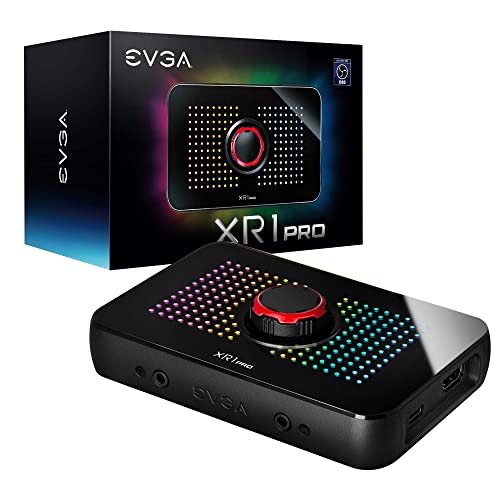
- 1440p144 HDR passthrough
- 4K60 HDR passthrough
- Built-in mixer and OBS certification
Best For: Windows users who do not need 240Hz passthrough
Best for 240Hz Passthrough
AVerMedia Live Gamer Ultra 2.1

- 1440p240 passthrough
- 4K144 HDR/VRR support
- Party chat and 5.1 audio features
Best For: High-refresh PC and console streaming
Best Internal Card

- HDMI 2.1 and VRR passthrough
- Up to 8K60 passthrough
- Designed for PCIe and dual-PC setups
Best For: Permanent Windows desktop streaming rigs
Best High-Refresh Pick

- 1440p/240Hz HDMI 2.1 passthrough
- HDR10 and VRR support
- Up to 4K/144 FPS Windows capture
Best For: High-refresh PC gaming and dual-PC streaming
Best Plug-and-Play Option
AVerMedia Live Gamer Extreme 3

- 1080p/240Hz passthrough
- VRR at 1440p/120Hz
- 4K60 HDR passthrough and 4K30 capture
Best For: Simple console and PC streaming setups
Best Compact HFR Choice

- 1440p/120Hz and 1080p/240Hz passthrough
- 4K60 capture
- HDR10 and analog audio input
Best For: Console creators needing 4K60 capture
Best HDMI 2.1 Pick

- Up to 8K60 and 4K144 HDR passthrough
- Captures up to 4K60 or 1080p240
- PCIe x4 card for Windows desktops
Best For: High-refresh HDMI 2.1 gaming PCs
Best External Value

- Supports 1080p240 passthrough
- Captures up to 4K60 and 2K144
- USB 3.0 for Windows, macOS, and Linux
Best For: Plug-and-play multi-platform streaming
Best Low-Latency Console Option

- Supports 1440p and 4K passthrough
- Virtually latency-free pass-through
- Captures uncompressed 1080p60 YUY2
Best For: Console streaming on PC or Mac
Best Overall – Elgato 4K X
The Elgato 4K X is a strong all-around choice for a capture card for 1440p 240Hz passthrough, with HDMI 2.1 connectivity, VRR support, and ultra-low-latency USB 3.2 Gen 2 performance. It also supports up to 4K144 capture and 1080p240 capture for compatible workflows.
Best For: Streamers who want flexible high-refresh passthrough for PC, PS5, Xbox Series X, or Switch.
Pros:
- Supports 1440p high-refresh gaming through HDMI 2.1 and VRR passthrough.
- Captures up to 4K144 or 1080p240, depending on the workflow.
- Works with OBS, Streamlabs, Twitch Studio, and other popular apps.
Cons:
- Requires a USB 3.2 Gen 2 port for its highest stated performance.
- Listed capture resolution details may vary by operating system and setup.
Choose the 4K X if you want a compact external card that combines high-refresh passthrough, VRR, and broad software compatibility without limiting you to a single console or platform.
Best Value – EVGA XR1 Pro
The EVGA XR1 Pro is a practical capture card for 1440p 240Hz passthrough shoppers who prioritize 1440p/144Hz HDR passthrough and straightforward USB setup. It captures up to 1440p60 and adds a built-in audio mixer and control dial.
Best For: Windows users seeking simple 1440p HDR passthrough with convenient physical audio controls.
Pros:
- Supports 1440p at 144Hz with HDR passthrough.
- Also supports 4K60 HDR passthrough.
- Plug-and-play setup with OBS certification and a built-in audio mixer.
Cons:
- Its listed passthrough rate is 144Hz, not 240Hz.
- Capture is limited to 1440p60 or 4K30.
- Designed for Windows and requires a USB 3.1 interface.
The XR1 Pro is worth considering when 1440p144 is sufficient and you value simple installation, OBS compatibility, RGB lighting, and hands-on audio adjustment over maximum refresh-rate passthrough.
Best for 240Hz Passthrough – AVerMedia Live Gamer Ultra 2.1
The AVerMedia Live Gamer Ultra 2.1 is one of the clearest matches for a capture card for 1440p 240Hz passthrough. Its HDMI 2.1 passthrough supports 1440p240, along with 4K144 HDR/VRR and 1080p360 on compatible displays.
Best For: High-refresh PC and console gamers who need 1440p240 passthrough plus party-chat and multichannel audio features.
Pros:
- Supports 1440p240 passthrough and 1080p360 passthrough.
- Offers 4K144 HDR/VRR passthrough through HDMI 2.1.
- Includes party-chat connections, 5.1 audio support, and a USB-C 10Gbps interface.
Cons:
- 4K passthrough may be limited to 4K120 with displays using DSC.
- 4K144 capture is specified for supported Windows PCs; macOS capture reaches up to 4K60.
- Some advanced audio features depend on compatible Windows workflows.
For buyers focused specifically on 1440p240, this model offers the most directly stated match in the group, while its HDR, VRR, party-chat, and audio support add value for more elaborate streaming setups.
Best Internal Card – Elgato 4K Pro
The Elgato 4K Pro is an internal PCIe capture card for buyers considering a capture card for 1440p 240Hz passthrough in a desktop streaming system. HDMI 2.1, VRR passthrough, and dual-PC compatibility support a high-end setup, while passthrough reaches up to 8K60.
Best For: Windows desktop streamers building an internal or dual-PC capture setup.
Pros:
- Supports HDMI 2.1 and VRR passthrough.
- Passthrough reaches up to 8K60 and includes high-frame-rate support up to 1080p240 recording.
- Compatible with dual-PC setups and popular streaming applications.
Cons:
- Requires a Windows 10 system with an available PCIe slot.
- Its supplied notes do not explicitly state 1440p240 passthrough.
- Internal installation is less portable than an external USB capture card.
The 4K Pro makes sense for a permanent desktop rig where PCIe installation and dual-PC support are advantages. Consider it for broader HDMI 2.1 flexibility, but verify the exact 1440p240 behavior for your display and source combination.
Best High-Refresh Pick – 4K144 HDMI 2.1 Capture Card
If you need a capture card for 1440p 240Hz passthrough, this GUERMOK model is built around high-refresh gaming. HDMI 2.1 passthrough reaches 2560×1440 at 240Hz, with HDR10 and VRR support, while Windows capture modes support up to 4K at 144 FPS in MJPEG.
Best For: PC gamers, esports setups, and dual-PC streamers who want 1440p/240Hz passthrough plus flexible audio connections.
Pros:
- Supports 1440p at 240Hz passthrough with HDR10 and VRR.
- Windows capture supports up to 4K at 144 FPS in MJPEG and 1080p at 240 FPS in NV12.
- Includes mic, line, speaker, and headphone-monitoring connections.
- USB-C, USB 3.2 Gen2, PD 3.0, and UVC/UAC plug-and-play support add setup flexibility.
Cons:
- Some advertised capture formats and frame rates are Windows-specific.
- macOS capture is limited to up to 4K at 60 FPS.
- Its extensive audio and format options may be more than casual users need.
This is the strongest match in the group for a capture card for 1440p 240Hz passthrough, particularly when VRR, HDR10, high-bandwidth USB, and detailed audio routing matter.
Best Plug-and-Play Option – AVerMedia Live Gamer Extreme 3
The AVerMedia GC551G2 is a straightforward choice for gamers who want responsive passthrough and simple streaming setup. It supports 4K60 HDR passthrough, up to 1080p240 passthrough, and VRR passthrough at 1440p120 or 1080p120, but it does not provide 1440p240 passthrough.
Best For: Console and PC streamers who value plug-and-play operation, VRR support, and 1080p240 passthrough.
Pros:
- Supports high-refresh passthrough up to 1080p240.
- Offers VRR passthrough at 1440p120 or 1080p120.
- Provides 4K60 HDR passthrough and 4K30 capture.
- Includes 3.5mm audio input and output with no external power required.
Cons:
- Does not support 1440p at 240Hz passthrough.
- Capture resolution is limited to 4K30.
- Requires a computer with USB 3.2 Gen1 Type-C and supported Windows, macOS, or iPadOS versions.
Choose this model if ease of use and 1080p240 gaming are more important than 1440p240 compatibility. Its VRR support and simple connection process make it practical for everyday streaming.
Best Compact HFR Choice – Elgato 4K S
The Elgato 4K S is a compact USB-C capture card for console and PC creators who want high-frame-rate passthrough. It supports 1440p120 and 1080p240 passthrough, along with 4K60 capture and HDR10, though it is not a 1440p240 passthrough solution.
Best For: PS5, Xbox Series X/S, and Switch 2 users who want 4K60 capture with 1440p120 or 1080p240 passthrough.
Pros:
- Supports 1440p120 and 1080p240 high-frame-rate passthrough.
- Captures video at up to 4K60.
- Supports HDR10 with tone mapping on Windows.
- Includes analog audio input for game chat or commentary.
Cons:
- Does not support 1440p at 240Hz passthrough.
- HDR tone mapping is specified for Windows.
- Windows use requires Windows 11 and compatible hardware.
This is a sensible middle ground for creators who want Elgato’s cross-platform support, 4K60 capture, and useful high-frame-rate modes without needing 1440p240 passthrough.
Best HDMI 2.1 Pick – Elgato 4K Pro
If you need a capture card for 1440p 240hz passthrough, the renewed Elgato 4K Pro is a strong fit for a Windows desktop with a PCIe slot. Its HDMI 2.1 connection supports high-refresh passthrough, while capture reaches up to 1440p144 or 1080p240 with HDR10 and VRR support.
Best For: PC streamers using PS5, Xbox Series X, or Nintendo Switch 2 who want HDMI 2.1 passthrough and an internal card design.
Pros:
- Supports up to 8K60 and 4K144 HDR passthrough.
- Captures up to 4K60, 1440p144, or 1080p240.
- Includes HDR10, VRR, and ALLM passthrough support.
- Works with Elgato Studio, 4K Capture Utility, and OBS.
Cons:
- Requires a Windows desktop and PCIe x4 slot.
- The supplied warranty is 90 days because this is a renewed unit.
The Elgato 4K Pro is the most capable option here for high-end HDMI 2.1 setups, but its internal PCIe format limits it to compatible Windows desktops.
Best External Value – PORTTA DX20R
The PORTTA DX20R is an external capture card for 1440p 240hz passthrough setups that also need broad computer compatibility. It captures at up to 4K60 and supports 2K144 and 1080p240 modes, with USB 3.0 connectivity and compatibility across Windows, macOS, and Linux.
Best For: Streamers who want a plug-and-play USB capture device with VRR, HDR, and utility software for configuration.
Pros:
- Supports 1080p240 passthrough and 2K144 capture.
- Offers 4K60 capture and passthrough.
- Includes VRR and HDR technology.
- Works with Windows, macOS, and Linux without driver installation.
Cons:
- Its listed 2K capture rate is 144Hz, not 240Hz.
- Some advanced controls require the separate CapHub Utility.
With its compact USB 3.0 design and two-year warranty, the DX20R is a flexible choice for users who want easy setup across multiple operating systems.
Best Low-Latency Console Option – AVMATRIX UC2218-4K
The AVMATRIX UC2218-4K is a straightforward console-focused capture card for 1440p 240hz passthrough alternatives. It provides 1440p or 4K passthrough, captures uncompressed 1080p60 YUY2 video, and connects to a computer through USB 3.0.
Best For: PS5, Xbox, and other console users prioritizing virtually latency-free passthrough and simple PC or Mac streaming.
Pros:
- Supports 1440p and 4K passthrough.
- Provides virtually latency-free pass-through gameplay.
- Captures uncompressed 1080p60 YUY2 video.
- Works with PC and Mac and supports plug-and-play setup.
Cons:
- Capture is limited to 1080p60.
- The supplied notes do not list 240Hz passthrough support.
The UC2218-4K makes sense when smooth, low-latency console passthrough matters more than 240Hz support or higher-resolution capture.
How We Picked the Best Capture Card for 1440p 240hz Passthrough
We focused on models that can fit a high-refresh gaming workflow rather than judging capture quality alone. Priority went to HDMI 2.1 devices and products that clearly specify 1440p or 4K passthrough at high refresh rates. We also considered capture resolution, HDR support, variable refresh rate compatibility, connection type, latency, software support, and whether the device is better suited to a desktop, laptop, console, or hybrid setup.
Specifications can vary by source, cable, display, and operating system. Before buying, confirm the exact refresh-rate limits for your desired input, passthrough, and capture-output combination.
Quick Comparison
| Type | Best For | Main Advantage | Watch Out For |
|---|---|---|---|
| HDMI 2.1 USB | High-refresh console or PC streaming | Flexible installation and 4K/high-Hz passthrough | Requires a fast USB connection |
| Internal PCIe | Dedicated desktop streaming | Low latency and direct system integration | Needs an available PCIe slot |
| HDMI 2.0 USB | 1440p or 1080p setups | Lower cost and simple setup | May limit 4K or 240Hz operation |
| Renewed or budget models | Value-focused buyers | Potentially lower purchase price | Check warranty and exact specifications |
Key Buying Factors for a Capture Card for 1440p 240hz Passthrough
Passthrough and Capture Are Different
Passthrough sends the gameplay signal to your monitor or television, while capture sends a separate feed to the computer. A card may pass through 1440p at 240Hz but capture at a lower resolution or frame rate. Check both figures before assuming it will record or stream at the same quality you play.
HDMI 2.1 and Bandwidth
HDMI 2.1 is generally the safer choice for 1440p 240Hz, 4K high-refresh gaming, HDR, and modern consoles. Use certified high-bandwidth HDMI cables, and verify that your motherboard, laptop port, and USB connection can handle the required data rate.
VRR, HDR, and Latency
Variable refresh rate support can help prevent tearing, but compatibility depends on the graphics card, display, console, and software chain. HDR support is also not universal. For competitive games, prioritize stable passthrough and low latency over extra recording features.
Connection and Software
USB models are portable and convenient, but they need an appropriate USB 3.x port and may share bandwidth with other devices. PCIe cards are a strong option for a permanent desktop setup. Confirm compatibility with OBS, your operating system, and any audio-routing tools you plan to use.
Who Should Buy Which Capture Card for 1440p 240hz Passthrough?
Choose an HDMI 2.1 USB card if you switch between a gaming PC, PS5, Xbox Series X, or multiple displays and want the easiest installation. Choose an internal PCIe card if you stream regularly from one desktop and want a clean, permanently installed setup.
Choose a lower-cost HDMI 2.0 or budget model when your display is limited to 1440p or 1080p and you do not need 4K high-refresh passthrough. Choose a renewed product only when the savings justify checking its warranty, included accessories, condition, and return policy.