
Turning a DSLR into a webcam or streaming camera requires more than an HDMI cable. A capture card converts the camera’s HDMI output into a USB video signal that your computer, streaming software, or video-conferencing app can use.
These 10 options cover everything from affordable 1080p adapters to 4K models with higher frame rates and pass-through support. Use the guide below to narrow your choice by camera compatibility, workflow, and budget.
Best 10 Capture Card for Dslr Camera Picks for 2026
Premium Pick

- 1080p60 and up to 4K60 support
- Ultra-low-latency USB 3.0 connection
- Compatible with PC, Mac, and iPad
Best For: Creators wanting a polished DSLR streaming setup
Versatile Value

- 4K60 input with 1080p60 capture
- HDMI loop-out and 3.5mm mic input
- Works with cameras, consoles, and OBS
Best For: Mixed DSLR, gaming, and commentary setups
Feature-Rich Newcomer

- 4K60 RGB24 capture
- Plug-and-play with major streaming apps
- Includes cold/hot shoe adapter
Best For: Portable 4K camera production and conferencing
Budget-Friendly Choice

- Up to 4K30 capture and 1080p120 input
- Driver-free USB 3.0 operation
- Works with cameras, consoles, Windows, and Mac
Best For: Affordable portable camera streaming
Best 4K DSLR Capture Card
j5create 4K HDMI Video Capture Card

- Captures up to 4K30 video
- USB-C 3.2 with Type-A adapter
- Compact and driver-free
Best For: 4K streaming, podcasts, and field production
Best for Detailed Work
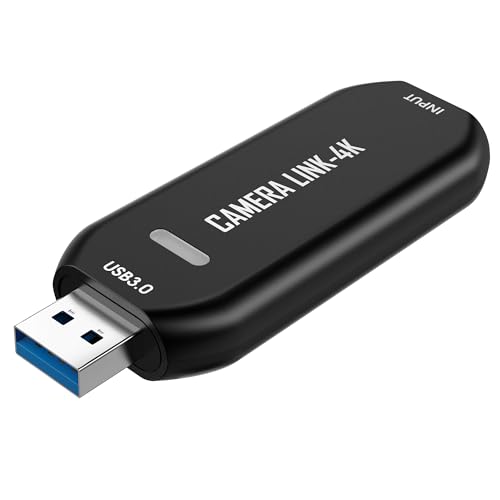
- Supports 1080p60 and 2K50
- Works with DSLRs and microscopes
- Plug-and-play with OBS and Zoom
Best For: Streaming, teaching, and precision recording
Best for Comfort
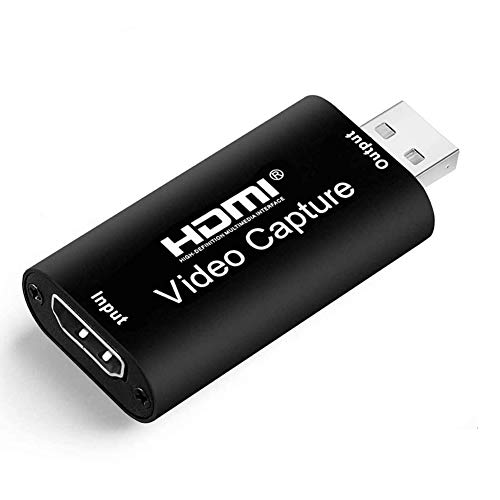
- 4K input with 1080p30 output
- Works with Windows, Mac, and Linux
- Driver-free USB connection
Best For: Basic DSLR streaming and video conferencing
Best with Extra Features
- Up to 4K60 input support
- Ultra-low-latency transmission
- Plug-and-play Windows and Mac setup
Best For: High-resolution streaming, recording, and multi-device HDMI capture
Best Pass-Through DSLR Capture Card
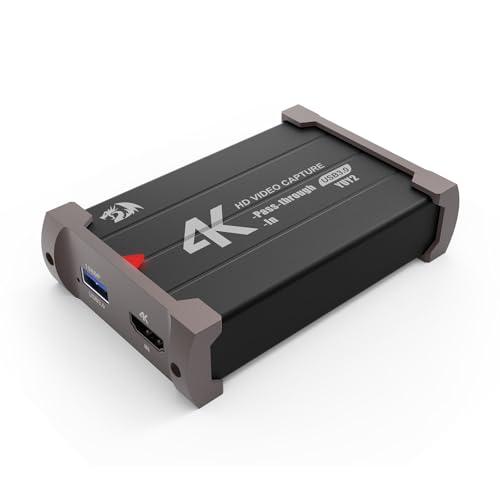
- 4K30 input with 1080p60 capture
- Zero-latency HDMI pass-through
- Simultaneous audio and video capture
Best For: DSLR streaming and gaming setups needing real-time monitoring
Best Budget DSLR Capture Card
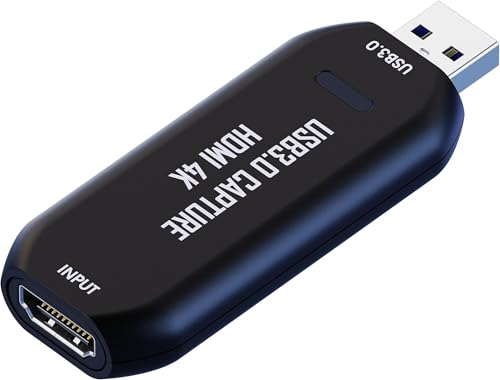
- 1080p60 and up to 2K50 support
- Plug-and-play Windows and Mac setup
- HDMI cable included
Best For: Simple DSLR streaming, video calls, and OBS recording
Premium Pick – Elgato Cam Link 4K
The Elgato Cam Link 4K is a polished capture card for DSLR camera setups, with USB 3.0 connectivity, ultra-low latency, and support for high-quality streaming or recording. It works with PC, Mac, and iPad, making it a versatile choice for creators who want a compact camera-to-computer connection.
Best For: Creators who prioritize a well-known brand, broad device compatibility, and high-resolution camera streaming.
Pros:
- Supports 1080p60 and up to 4K60 with a compatible camera and model.
- Ultra-low latency helps keep video and audio synchronized.
- Works with cameras, camcorders, action cameras, and iPhone, plus OBS, Zoom, and Discord.
- Compact design and included USB 3.0 extension cable simplify portable setups.
Cons:
- Actual resolution depends on the camera and the specific Cam Link 4K model.
- Compatibility and minimum requirements should be checked for the intended Windows or Mac system.
With strong software compatibility and a two-year warranty, this is a dependable option for DSLR-based livestreaming and video conferencing. Its main appeal is the straightforward, low-latency workflow rather than console-focused extras.
Versatile Value – VIXLW 4K HDMI Capture Card
This VIXLW capture card for DSLR camera use combines HDMI loop-out, USB 3.0 capture, and a microphone input in one compact device. It captures up to 1080p60 over USB, accepts 4K60 HDMI input, and supports cameras, consoles, computers, and streaming software.
Best For: Users who need one capture device for DSLR streaming, gaming, presentations, and external microphone commentary.
Pros:
- Supports 4K60 HDMI input and loop-out while capturing up to 1080p60.
- Plug-and-play operation requires no driver or external power supply.
- Broad compatibility includes Windows, macOS, Linux, Android, cameras, and major consoles.
- Includes HDMI loop-out and a 3.5mm microphone input for live commentary.
Cons:
- The microphone input accepts a 3.5mm microphone headset and does not record party chats.
- The listed warranty is 60 days, shorter than some alternatives.
- OBS may need to be restarted after audio setup.
This is a flexible, feature-heavy choice for mixed camera and gaming use. Its loop-out and mic input add practical value, though buyers should weigh the shorter warranty and confirm their desired capture format.
Feature-Rich Newcomer – AVerMedia CamStream 4K
The AVerMedia CamStream 4K is a compact capture card for DSLR camera and camcorder workflows, offering up to 4K60 RGB24 capture through HDMI and USB. Its plug-and-play design, synchronized audio and video, and included cold/hot shoe adapter suit livestreaming, conferencing, and mobile production setups.
Best For: Camera users who want 4K60 RGB24 capture, simple setup, and a mounting accessory for portable production.
Pros:
- Captures up to 4K60 video with RGB24 color from supported cameras.
- Plug-and-play operation works with OBS Studio, Streamlabs, Zoom, Twitch, and YouTube Live.
- Designed for synchronized audio and video with ultra-low-latency monitoring.
- Includes a 1/4-inch cold/hot shoe mount adapter and a three-year manufacturer warranty.
Cons:
- Operating-system support is specified for relatively recent Windows, macOS, iPadOS, and Android versions.
- The listed hardware interface is HDMI, so the camera must provide a compatible HDMI output.
Its 4K60 RGB24 capability and mounting adapter make the CamStream 4K especially appealing for camera-first creators. Verify operating-system requirements and camera output compatibility before buying.
Budget-Friendly Choice – Mwin Cam Link 4K
The Mwin Cam Link 4K is a budget-oriented capture card for DSLR camera, camcorder, and action-camera streaming. It uses USB 3.0 for low-latency transfer, supports up to 4K30 capture and 1080p120 input, and works with Windows and Mac software such as OBS, VLC, and Amcap.
Best For: Streamers and video callers seeking an affordable, portable capture solution for cameras or consoles.
Pros:
- Supports up to 4K30 capture, 1440p60, and 1080p120 input.
- Plug-and-play operation requires no driver or external power.
- Compatible with DSLR cameras, camcorders, action cameras, consoles, Windows, and Mac.
- Compact design and a two-year warranty suit portable setups.
Cons:
- An HDMI cable is not included.
- The stated capture resolution is up to 4K30 rather than 4K60.
- Requires a computer with USB 3.0 and compatible streaming software.
This model offers a practical way to turn an HDMI camera into a webcam or streaming source without adding external power. It is best suited to buyers who value affordability and broad compatibility over premium 4K60 capture.
Best 4K DSLR Capture Card – j5create 4K HDMI Video Capture Card
The j5create 4K HDMI Video Capture Card is a compact capture card for DSLR camera setups that need high-resolution video for streaming, recording, podcasts, or field production. Its USB-C 3.2 Gen 1 connection supports 4K30 capture, while the included USB Type-A adapter broadens compatibility with computers.
Best For: Live streaming, video podcasts, field production, and gameplay capture.
Pros:
- Supports 4K at 30 fps, 2K at 60 fps, and 1080p at 120 fps.
- Works with OBS, XSplit, CameraFi, QuickTime, and other capture software.
- Compact, portable design with no driver installation required.
- USB-C cable includes a USB Type-A adapter.
Cons:
- Only one capture channel is listed.
- Requires a camera or other HDMI source with a compatible output.
With its faster USB 3.2 interface and broader resolution support, this is the strongest fit of the three for creators who want 4K DSLR capture in a portable package.
Best for Detailed Work – Cam Link 4K USB Capture Card
This Cam Link 4K USB capture card connects a DSLR camera to a Windows or Mac computer through HDMI and USB 3.0. It is designed for smooth recording and streaming, while also supporting microscopes, action cameras, teaching sessions, and precision inspection work.
Best For: DSLR streaming, microscope recording, online teaching, and detailed DIY or inspection projects.
Pros:
- Captures up to 1080p60 or 2K50 resolution.
- Compatible with DSLR cameras, microscopes, action cams, and other HDMI devices.
- Plug-and-play operation requires no driver installation.
- Works with OBS, Zoom, and other streaming software.
Cons:
- The supplied notes do not specify 4K output capture.
- Compatibility is listed for Windows and Mac rather than Linux.
This model is a versatile choice when your capture card for DSLR camera use also needs to handle close-up visuals, instruction, or precision work.
Best for Comfort – HDMI Video Capture Card
This HDMI video capture card provides a straightforward way to connect a DSLR camera, camcorder, or action camera to a computer for live streaming and recording. It accepts up to 4K input but outputs Full HD 1080p at 30 fps over USB 2.0, with support for Windows, Mac, and Linux.
Best For: Basic DSLR streaming, video conferences, teaching, and console capture.
Pros:
- Accepts 4K input and outputs 1080p at 30 fps.
- Supports Windows, Mac, and Linux systems.
- No external driver or power supply is required.
- Works with OBS, Twitch, YouTube, PotPlayer, and VLC.
Cons:
- USB 2.0 limits output to 1080p30.
- Its single-channel design is intended for one HDMI source at a time.
- Does not provide the higher frame rates listed for the other options.
This is a practical entry-level capture card for DSLR camera owners who prioritize broad operating-system compatibility and simple Full HD streaming over 4K output or high frame rates.
Best with Extra Features – Cam Link 4K
If you need a capture card for DSLR camera use across streaming, recording, or video calls, this VIXLW model offers a high-resolution, low-latency connection over USB 3.0. It supports Windows and macOS and requires no drivers or external power.
Best For: Creators who want 4K-capable DSLR, camcorder, action camera, microscope, or console capture for OBS, Zoom, livestreaming, and precision-work recording.
Pros:
- Supports input and capture modes up to 4K60, plus 1080p120 in supported formats.
- Designed for ultra-low-latency audio and video transmission.
- Works with Windows and macOS without drivers or external power.
- Compatible with cameras, consoles, laptops, microscopes, and other HDMI devices.
Cons:
- Actual resolution and frame rate depend on the selected video format and host setup.
- USB 3.0 and an HDMI-output device are required.
Its broad compatibility and high stated frame-rate support make it a flexible choice when a DSLR capture card also needs to handle gaming, teaching, or equipment demonstrations.
Best Pass-Through DSLR Capture Card – Redragon VC321
The Redragon VC321 is a practical capture card for DSLR camera setups that need 4K HDMI input alongside 1080p60 capture. Its zero-latency pass-through is useful when you want to monitor or play from the HDMI source while recording on a computer.
Best For: DSLR users, streamers, and gamers who want 1080p60 capture with 4K30 input support and real-time HDMI pass-through.
Pros:
- Supports up to 4K30 input and 1080p60 capture.
- Provides zero-latency HDMI pass-through for real-time monitoring.
- Captures video and audio simultaneously.
- Plug-and-play design needs no additional drivers or power source.
Cons:
- Capture output is specified at up to 1080p, not 4K.
- Compatibility is listed for Windows 7 and newer and macOS 10.15 and newer.
Choose this model if pass-through matters as much as capture quality; it is especially well suited to workflows where the source must remain responsive while the computer records or streams.
Best Budget DSLR Capture Card – Cam Link 4K
This VIXLW Cam Link 4K is a straightforward capture card for DSLR camera streaming and recording, connecting an HDMI-equipped camera to a Mac or PC through USB 3.0. It supports 1080p60 and up to 2K50, with a driverless setup on Windows and Mac.
Best For: DSLR owners who want an uncomplicated OBS, QuickTime, Zoom, or livestreaming connection with included HDMI cable.
Pros:
- Captures up to 1080p60 or 2K50 according to the supplied notes.
- Driverless plug-and-play operation without external power.
- Works with Windows, Mac, and Linux systems listed by the manufacturer.
- Includes an HDMI cable and user manual.
Cons:
- Windows 11 users may need to request and manually install compatibility patches.
- Requires separate acquisition software, with OBS and QuickTime recommended.
- The listed maximum capture resolution is 1080p, despite support for 2K50.
This is a sensible pick for basic camera-to-computer capture when 1080p60 is sufficient and you value a simple package with the necessary HDMI cable included.
How We Picked the Best Capture Card for Dslr Camera
We focused on capture devices designed for DSLR, mirrorless, camcorder, and action-camera HDMI feeds. The selection includes USB 3.0 models, compact plug-and-play adapters, and higher-performance options that advertise 4K capture, high-frame-rate 1080p, or HDMI pass-through.
We also considered the features that affect everyday use: supported input and output resolutions, latency, operating-system compatibility, connection type, portability, and whether the device is better suited to streaming, recording, video calls, or specialized camera workflows.
Quick Comparison
| Type | Best For | What to Look For |
|---|---|---|
| Basic USB capture card | Casual streaming and calls | 1080p support, reliable USB connection, broad software compatibility |
| 4K capture card | High-resolution recording | 4K input support, suitable frame rates, adequate computer bandwidth |
| High-frame-rate model | Gaming, motion, and smooth video | 1080p at 60fps or higher, low latency, stable USB 3.0 performance |
| Pass-through model | Monitoring while capturing | Separate HDMI output, supported pass-through resolution, minimal delay |
Key Buying Factors for a Capture Card for Dslr Camera
Camera Output and Clean HDMI
First, confirm that your camera provides HDMI output and can deliver a clean feed without menus, focus boxes, or battery warnings. Some cameras limit resolution or frame rate over HDMI, so a card’s advertised 4K capability does not guarantee 4K capture from every DSLR.
Resolution and Frame Rate
Choose based on the final use. Full HD at 30fps is sufficient for many meetings and basic streams, while 1080p at 60fps produces smoother motion. A 4K capture card makes sense for high-resolution recording or future flexibility, but it requires compatible camera output, software, storage, and computer performance.
Latency, Pass-Through, and Ports
Low latency matters when monitoring live action or gaming. HDMI pass-through is useful when you want to send the camera feed to a monitor while also capturing it on a computer. Check whether the device uses USB 3.0, USB-C, or an adapter, and verify that your computer has the required port and bandwidth.
Software and Power Requirements
Many USB capture cards appear as standard UVC video devices and work with apps such as OBS, Zoom, Teams, and similar software. Confirm compatibility before buying, especially for macOS, Linux, or older computers. Also check whether the camera needs continuous power, dummy-battery support, or automatic sleep settings disabled.
Who Should Buy Which Capture Card for Dslr Camera?
For casual video calls: Choose an affordable plug-and-play 1080p model with broad software support. Paying for 4K may not improve a video-conferencing image if the service compresses the feed.
For regular livestreaming: Prioritize dependable USB 3.0 operation, 1080p at 60fps, low latency, and a camera with clean HDMI and continuous power.
For professional recording: Select a reputable 4K-capable device and verify the complete signal chain, including the camera, HDMI cable, capture software, monitor, and storage.
For gaming or live monitoring: Look for HDMI pass-through and minimal delay. This lets you monitor the source directly while the computer records or broadcasts the captured feed.