
Choosing the best capture card for Nintendo Switch can make streaming, recording, and sharing gameplay far easier. The right model should deliver smooth 1080p video, dependable audio, and simple USB connectivity without adding noticeable lag.
We compared 10 options ranging from compact budget devices to feature-rich cards with 4K pass-through, helping you find a practical match for your setup, software, and streaming goals.
Best 10 Capture Card for Nintendo Switch Picks for 2026
Best Value 4K Pass-Through

- 1080p60 USB capture
- 4K input and pass-through
- 3.5mm mic input
Best For: Budget-conscious Switch streamers needing commentary support
Premium Performance Pick

- 4K60 capture
- 1440p120 and 1080p240 pass-through
- HDR10 and analog audio input
Best For: Advanced streamers with modern gaming and computer hardware
Most Versatile Connectivity
- 2K30 and 1080p60 capture
- USB-A and USB-C ports
- Broad computer and mobile compatibility
Best For: Multi-device streaming with laptops, tablets, or phones
Best Portable Setup
Compact 4K HDMI USB Capture Card

- 4K input with 2K30 or 1080p60 recording
- USB 3.0 and USB-C flexibility
- Compact plug-and-play design
Best For: Traveling streamers and mobile recording setups
Best All-Around Switch Capture
4K Pass-Through 1080p60 Capture Card

- 4K 60Hz HDMI pass-through
- 1080p60 or 2K30 capture
- USB-A/USB-C and mic input
Best For: Flexible Switch streaming and recording setups
Best Plug-and-Play Switch Capture

- 4K input with 1080p60 output
- No drivers or external power
- Built-in mic input and USB-A/USB-C
Best For: Simple Switch streaming and commentary
Best Portable Switch Capture
- 1080p60 or 2K30 capture
- Compact aluminum design
- Plug-and-play USB-C/USB connectivity
Best For: Portable Switch streaming and recording
Simple Switch Streaming Setup

- Captures up to 1080p video
- Plug-and-play USB 3.0 setup
- HDMI loop-out and 3.5mm mic input
Best For: Beginner Switch streamers who want simple 1080p capture
Portable Creator Pick
- Records 1080p at 60FPS
- Supports 4K HDMI preview and passthrough
- Compact design with USB connection adapters
Best For: Mobile creators and multi-console streamers
Feature-Rich Pass-Through Option

- 4K60 input and HDMI loop-out
- Captures up to 1080p at 60FPS
- Includes mic input and USB-C adapter
Best For: Advanced Switch setups needing flexible passthrough
Best Value 4K Pass-Through – USB 3.0 1080p60 Capture Card
This capture card for Nintendo Switch is a practical choice for streamers who want 1080p at 60fps capture, 4K pass-through, and broad device compatibility without adding external power or drivers. Its USB 3.0 connection is suited to recording or streaming through software such as OBS, Twitch, YouTube, and VLC.
Best For: Switch gameplay streaming, commentary, and multi-console setups on a budget.
Pros:
- Captures up to 1080p at 60fps through USB 3.0.
- Supports 4K input and 4K 30Hz zero-latency HDMI pass-through.
- Includes a 3.5mm mic input for commentary.
- Plug-and-play design works with Windows, macOS, Linux, and select Android devices.
Cons:
- USB output is limited to 1080p at 60fps.
- The mic input does not record party chat.
- Requires a USB 3.0 port for its stated capture performance.
Choose this model if you want a versatile, straightforward setup with 4K pass-through and microphone support. It is less suitable if you specifically need party-chat recording or higher-than-1080p USB capture.
Premium Performance Pick – Elgato 4K S Capture Card
For shoppers seeking a more advanced capture card for Nintendo Switch, the Elgato 4K S adds 4K60 capture, high-frame-rate pass-through, HDR10 support, and a USB-C connection. It is designed for modern consoles and computers, with analog audio input for chat or commentary.
Best For: Serious streamers using current consoles, HDR workflows, or high-refresh gaming displays.
Pros:
- Captures video at up to 4K60.
- Supports 1440p120 and 1080p240 pass-through.
- HDR10 support includes tone mapping on Windows.
- 3.5mm analog audio input can capture chat or commentary.
Cons:
- Requires relatively recent hardware, including Windows 11, macOS 13 or later, or compatible iPadOS devices.
- Listed minimum requirements include a modern CPU, suitable GPU, and USB 3.0 Type-C port.
- Its feature set may be more than needed for basic 1080p Switch recording.
The 4K S is the strongest fit for users who value high-resolution capture and high-refresh pass-through. Check your computer and display compatibility before buying, especially if you plan to use HDR or 4K60 recording.
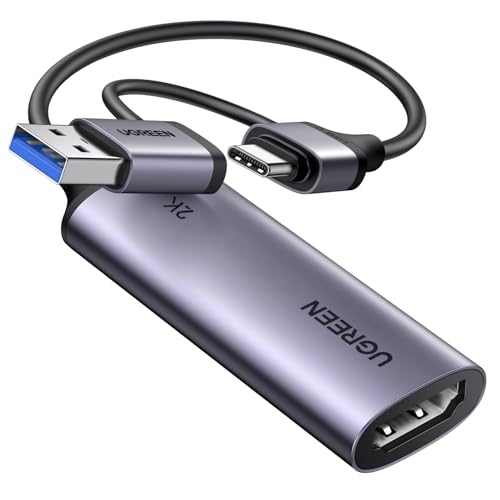
Most Versatile Connectivity – UGREEN 2K HDMI Capture Card
The UGREEN capture card for Nintendo Switch balances 2K recording with 1080p60 compatibility and includes both USB-A and USB-C interfaces. Its driver-free design supports computers, tablets, and phones, making it useful for flexible streaming and recording setups.
Best For: Creators who switch between USB-A and USB-C devices or stream to tablets and laptops.
Pros:
- Supports 4K input, 2K at 30fps output, and 1080p at 60fps.
- Includes both USB-A and USB-C connectivity.
- Works with Windows, macOS, Linux, and compatible mobile devices.
- Aluminum housing helps with heat dissipation and EMI shielding.
Cons:
- Only supports unidirectional HDMI input to USB output.
- iPadOS devices require version 17 or later.
- Console sources may require HDCP to be disabled.
UGREEN is a useful option when device flexibility matters as much as capture quality. Its 2K30 mode offers more resolution than standard 1080p, while 1080p60 remains available for smoother Switch gameplay capture.
Best Portable Setup – Compact 4K HDMI USB Capture Card
This compact capture card for Nintendo Switch offers 4K HDMI input, 2K30 recording, and 1080p60 capture through USB 3.0. It includes a USB 3.0-to-USB-C adapter and uses a portable aluminum design, making it convenient for mobile streaming, recording, meetings, and gaming setups.
Best For: Portable Switch streaming and users who need USB 3.0 or USB-C connection options.
Pros:
- Supports 4K input and recording up to 2K30 or 1080p60.
- Includes a USB 3.0-to-USB-C adapter.
- Plug-and-play operation requires no driver or external power.
- Compatible with OBS, Zoom, VLC, Twitch Studio, Windows, macOS, Linux, and Android.
Cons:
- Its listed capture resolution is 1080p, with 2K recording limited to 30fps.
- Tablet use requires OTG support to be enabled.
- The source device should be tested with a monitor first to confirm video and audio output.
This model makes sense for users who want a small, simple capture device that can move between computers and mobile setups. The included adapter improves connection flexibility, while 1080p60 is the better choice for smooth gameplay recording.
Best All-Around Switch Capture – 4K Pass-Through 1080p60 Capture Card
This capture card for Nintendo Switch is a flexible choice for streaming and recording, combining 4K 60Hz HDMI pass-through with capture up to 1080p at 60fps or 2K at 30fps. Its USB-A/USB-C connectivity and mic input make it practical for gaming commentary and mixed device setups.
Best For: Switch gamers who want smooth 1080p60 capture, 4K pass-through, and flexible computer connectivity.
Pros:
- Supports 4K 60Hz HDMI input and loop-out pass-through.
- Captures up to 1080p at 60fps or 2K at 30fps.
- Includes USB-A/USB-C connectivity and a 3.5mm mic input.
- Works with OBS Studio, Twitch, YouTube, Windows, macOS, Linux, and Android.
Cons:
- It does not record party chats through the mic input.
- OBS may need to be restarted after audio setup.
With its broad compatibility and high-refresh pass-through, this is a well-rounded option for Switch streaming setups. Choose it if you value flexible ports and commentary support more than a minimal design.
Best Plug-and-Play Switch Capture – Acer 1080p60 USB 3.0 Card
Acer’s capture card for Nintendo Switch focuses on simple setup and smooth 1080p at 60Hz output. It accepts 4K input, includes USB Type-A and Type-C ports, and adds a mic input for commentary without requiring extra drivers or external power.
Best For: Beginners and creators who want a compact, driver-free capture setup with straightforward audio commentary.
Pros:
- Accepts 4K HDMI input and outputs up to 1080p at 60Hz.
- Plug-and-play design requires no extra drivers or external power.
- Built-in mic input supports voice commentary and helps keep audio synchronized.
- Compatible with Switch, Switch 2, PS5/PS4, Xbox, cameras, OBS, and XSplit.
Cons:
- USB 3.0 is required for USB 3.0 operation.
- The supplied details list capture output up to 1080p, rather than 2K capture.
This Acer model is a practical pick when ease of use matters most. Its 4K input and 1080p60 output suit everyday streaming, while the mic input and wide app compatibility reduce setup complexity.
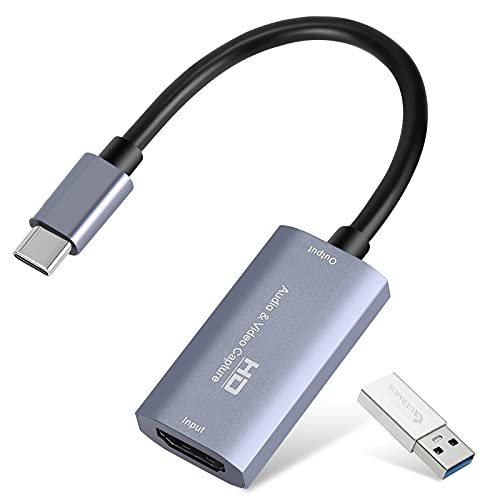
Best Portable Switch Capture – Compact 1080p60 USB 3.0 Card
This capture card for Nintendo Switch is designed for portable recording and streaming, with a compact aluminum body and plug-and-play operation. It supports up to 4K input and captures up to 1080p at 60fps or 2K at 30fps through USB 3.0.
Best For: Travelers and creators who need a lightweight Switch capture device for mobile streaming, recording, meetings, or teaching.
Pros:
- Supports 1080p at 60fps and 2K at 30fps capture.
- Compact, lightweight aluminum design is easy to carry.
- Requires no additional drivers or external power.
- Works with USB-C and USB connections and supports OBS, VLC, Zoom, Windows, macOS, Linux, and Android.
Cons:
- It is for capture only and cannot directly cast to a monitor or TV.
- USB 3.0 is recommended for full bandwidth and resolution.
- OBS may need to be restarted after audio setup, and adapters can be recognized as USB 2.0.
Its portability and driver-free setup make this a convenient choice for on-the-go Switch capture. Be sure to use a USB 3.0 connection and capture software, since it is not intended as a direct display adapter.
Simple Switch Streaming Setup – 1080p USB 3.0 Capture Card
This capture card for Nintendo Switch is a straightforward choice for recording or streaming gameplay at up to 1080p. Its USB 3.0 connection, plug-and-play setup, HDMI loop-out, and microphone input cover the core needs of a basic OBS or live-streaming setup.
Best For: Nintendo Switch players who want an affordable, beginner-friendly capture setup with commentary support.
Pros:
- Captures video up to 1080p and supports live streaming through platforms such as Twitch, YouTube, and Facebook.
- Plug-and-play operation requires no driver or external power supply.
- HDMI loop-out is designed for playing without noticeable capture delay.
- Includes a 3.5mm microphone input for external commentary.
Cons:
- Capture resolution is limited to 1080p.
- The microphone input accepts only a 3.5mm TRS standard microphone headset.
- Requires a computer with a USB 3.0 port and a compatible operating system.
This model focuses on easy setup and essential features rather than higher-resolution capture. It is a practical fit for Switch streaming when 1080p output is sufficient and you want loop-through gameplay plus voice commentary.
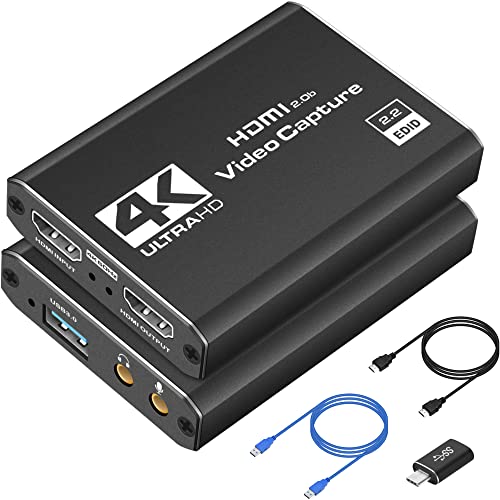
Portable Creator Pick – 1080p 60FPS HDMI Capture Card
This capture card for Nintendo Switch is aimed at creators who want smooth 1080p 60FPS recording without a complicated installation. It connects over USB 3.0, works with OBS, Streamlabs, and XSplit, and supports HDMI passthrough for real-time gameplay.
Best For: Streamers and content creators who value 1080p 60FPS capture, broad device compatibility, and a compact setup.
Pros:
- Supports 1080p 60FPS capture for detailed, smooth gameplay footage.
- Offers 4K HDMI real-time preview and HDMI passthrough.
- Works with Nintendo Switch, PS5, Xbox, cameras, Windows, and macOS.
- Compact, lightweight design includes USB-A and USB-C connection accessories.
Cons:
- Requires a USB 3.0 port on the computer.
- The listed 4K capability is for HDMI input or preview, while recording is specified at 1080p 60FPS.
- Setup still depends on compatible streaming software such as OBS Studio, Streamlabs, or XSplit.
Its strongest advantage is the balance of smooth 1080p capture, passthrough, and portability. Choose it if you regularly move between setups or want a versatile capture device for Switch and other HDMI sources.
Feature-Rich Pass-Through Option – 4K60 HDMI Capture Card
This capture card for Nintendo Switch adds higher-spec HDMI input and loop-out to a 1080p 60FPS capture workflow. It supports 4K 60Hz input and passthrough, up to 2K 30Hz output over USB 3.0, low-latency operation, and a 3.5mm microphone input for commentary.
Best For: Streamers who want flexible HDMI passthrough, multiple resolution options, and compatibility with Switch, consoles, cameras, and computers.
Pros:
- Supports 4K 60Hz HDMI input and loop-out while capturing up to 1080p 60FPS.
- Can output up to 2K 30Hz through USB 3.0 with YUY2.
- Provides plug-and-play operation, low-latency capture, and a heat-dissipating aluminum alloy body.
- Includes HDMI loop-out, 3.5mm mic input, USB-A cable, and USB-A to USB-C adapter.
Cons:
- Does not support 4K 120Hz or 144Hz input.
- The microphone input does not record party chat.
- After audio setup, OBS may need to be restarted to avoid missing sound output.
This is the most flexible option of the three for users who want 4K passthrough alongside 1080p capture. Its added controls and compatibility make it attractive for more involved setups, though the resolution limits and audio configuration notes are worth keeping in mind.
How We Picked the Best Capture Card for Nintendo Switch
We focused on the features that matter most for Switch gameplay: supported input and output resolutions, 1080p frame rates, pass-through capability, USB connection type, audio handling, compatibility, and ease of setup. Because the Nintendo Switch outputs up to 1080p, a card that reliably captures 1080p at 60 frames per second is usually a better priority than one that only advertises a higher input resolution.
We also included a range of designs and price points. Some options are simple USB 3.0 devices for occasional recording, while others add 4K HDMI pass-through for newer consoles and more advanced streaming setups. Product specifications can vary by operating system, software, and connection, so verify the manufacturer’s requirements before buying.
Quick Comparison
| Feature | What to look for | Why it matters |
|---|---|---|
| Capture resolution | 1080p at 60fps | Produces smooth, detailed Switch recordings and streams |
| Pass-through | 4K or 1080p HDMI loop-out | Lets you play on a monitor or TV with minimal added delay |
| Connection | USB 3.0 or USB-C | Provides the bandwidth needed for high-quality video |
| Input support | HDMI input, often with 4K support | Leaves room for other consoles and future upgrades |
| Software support | UVC-compatible or listed streaming apps | Reduces setup problems with OBS, Zoom, and similar software |
Key Buying Factors for a Capture Card for Nintendo Switch
Capture Quality and Frame Rate
For most Switch users, 1080p60 capture is the ideal target. It keeps fast games looking fluid while maintaining manageable file sizes and streaming requirements. Be cautious of products that list 4K input but capture only at 1080p; this can still be useful, but the distinction matters.
Pass-Through and Latency
HDMI pass-through sends the console signal to your display while the computer records a separate feed. A 4K pass-through model may be worthwhile if you also use a PS5, Xbox Series console, or 4K monitor. For Switch-only use, reliable 1080p pass-through may be sufficient. Look for low-latency operation and play from the connected display rather than the preview window whenever possible.
USB and Compatibility
USB 3.0 is preferable for 1080p60 video. USB-C describes the connector, not necessarily the speed, so check the actual specification. Confirm compatibility with your computer, operating system, OBS or other recording software, microphone setup, and available USB bandwidth.
Audio and Accessories
Check whether HDMI audio is captured correctly and whether the card provides a headphone or microphone connection. You may also need a suitable HDMI cable, USB cable, powered hub, or console audio solution. Remember that protected video sources such as streaming services generally cannot be captured legally or technically through these devices.
Who Should Buy Which Capture Card for Nintendo Switch?
Choose a basic USB 3.0 model if you want an affordable way to record or stream Switch gameplay at 1080p60. These are suitable for beginners, casual creators, and remote presentations.
Choose a 4K pass-through model if you use multiple consoles, own a 4K display, or want a cleaner upgrade path. It can pass a higher-resolution signal to your display while still capturing the Switch at its practical maximum.
Choose a compact USB-C option if portability and laptop compatibility are priorities. Confirm that the included cable and your computer’s port support the advertised performance.
For most buyers, the best overall balance is a capture card with dependable 1080p60 capture, USB 3.0 connectivity, low-latency HDMI pass-through, and broad software compatibility.