
The best photo printers under $300 make it easy to turn phone photos, family snapshots, and creative projects into physical prints without investing in professional equipment.
This roundup compares compact dye-sublimation models, portable instant printers, and versatile all-in-one inkjets so you can choose the right balance of print quality, convenience, paper size, and ongoing cost.
Best 10 Photo Printers Under 300 Picks for 2026
Best Starter Bundle

- Includes 100 sheets and three cartridges
- Dedicated hotspot supports up to five devices
- App offers filters, borders, and ID-photo printing
Best For: Easy smartphone printing with supplies included
Best All-in-One
Epson Expression Premium XP-7100

- Prints, scans, copies, and uses a 30-page ADF
- Supports duplexing and borderless photos up to 8x10 inches
- Wireless, USB, and Ethernet connectivity
Best For: Home offices needing photo and document functions
Best Value Bundle

- Includes 108 sheets and two ribbons
- Protective film resists water, scratches, and fading
- HeyPhoto app adds templates and AR video mode
Best For: Immediate, high-volume casual snapshot printing
Best Pocket Pick
Kodak Step Instant Photo Printer

- Pocket-sized 2x3-inch ZINK prints
- Bluetooth and NFC for iOS and Android
- Rechargeable battery prints up to 25 photos
Best For: Portable scrapbooking and quick phone-photo prints
Best for Everyday Use
HP Envy Photo 7975 Wireless Printer

- Prints photos, documents, copies, and scans
- Automatic duplexing, ADF, and separate photo tray
- Wi-Fi, USB, touchscreen, and mobile printing
Best For: Families needing one home photo and document printer
Best for Sticker Projects
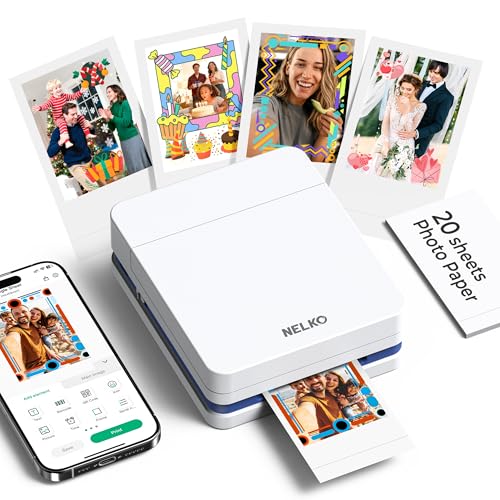
- Portable 2x3-inch adhesive color prints
- 600 DPI output with water- and smudge-resistant paper
- App includes AI editing, stickers, frames, and collages
Best For: Scrapbooking, journaling, and DIY sticker projects
Best with Extra Features

- 108 sheets and two ribbons included
- Protective 4x6 dye-sublimation prints
- Wireless printing with creative app features
Best For: Frequent casual printing and parties
Best for Travel

- Rechargeable battery prints up to 40 photos
- Built-in Wi-Fi hotspot for direct connection
- Vibrant, protected 4x6 dye-sublimation output
Best For: Mobile printing away from outlets
Best Simple Setup
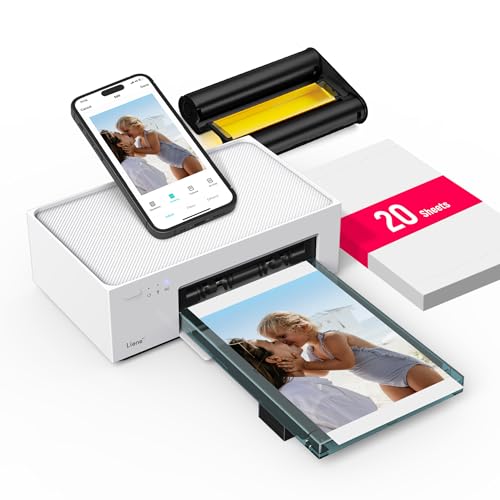
- Direct Wi-Fi hotspot connection
- Supports up to five devices
- App includes frames, filters, and ID photos
Best For: Shared home 4x6 photo printing
Best Portable Pick – Canon Selphy CP1500
For shoppers comparing photo printers under 300, the Canon Selphy CP1500 is a compact dye-sublimation model designed for convenient 4×6-inch printing. Its Wi-Fi, USB, and memory-card connections make it flexible for home use, travel, and sharing photos from multiple devices.
Best For: Portable, versatile photo printing with multiple connection options.
Pros:
- Compact design with optional battery support for printing on the go.
- Produces dry, water-resistant prints designed to last up to 100 years.
- Supports smartphones, computers, cameras, memory cards, and USB flash drives.
- Built-in 3.5-inch display supports viewing, editing, and filter effects.
Cons:
- Maximum print size is limited to 4×6 inches and smaller formats.
- Optional battery support is required for use away from an outlet.
The CP1500 stands out when portability and connection flexibility matter more than large-format printing. It is a practical choice for quickly producing durable snapshots at home or while traveling.
Best Starter Bundle – Liene M100 4×6 Photo Printer
The Liene M100 is a strong option among photo printers under 300 for buyers who want a ready-to-use 4×6-inch setup. It includes 100 sheets of photo paper and three color cartridges, while its dedicated Wi-Fi hotspot supports printing from phones without requiring another network.
Best For: Families and casual users who want bundled supplies and straightforward smartphone printing.
Pros:
- Includes 100 sheets of paper and three cartridges.
- Thermal dye-sublimation prints have a laminated surface resistant to water, scratches, fingerprints, and fading.
- Dedicated Wi-Fi hotspot supports up to five simultaneous device connections.
- App includes borders, filters, brightness and contrast adjustments, and ID-photo printing.
Cons:
- Uses proprietary Liene cartridges.
- Prints are limited to the 4×6-inch format.
- The supplied notes advise cleaning the print head if smudges appear.
With paper and cartridges included, the M100 lowers the friction of getting started. Its multi-device hotspot and editing app also make it convenient for group events and everyday snapshot printing.
Best All-in-One – Epson Expression Premium XP-7100
Epson Expression Premium XP-7100 Wireless Color Photo Printer with ADF, Scanner and Copier (Renewed)
Check Price On AmazonFor buyers looking beyond snapshot-only models, the renewed Epson Expression Premium XP-7100 adds scanning, copying, automatic duplexing, and an auto document feeder to photo printing. Among photo printers under 300, it is suited to home users who need both high-quality photos and everyday document features.
Best For: Home offices that need photo printing, scanning, copying, and document handling in one device.
Pros:
- Combines printing, scanning, and copying with a 30-page auto document feeder.
- Supports automatic two-sided printing, copying, and scanning.
- Prints borderless photos up to 8×10 inches and supports specialty paper and DVDs.
- Offers wireless connectivity plus USB and Ethernet interfaces.
Cons:
- This is a renewed product rather than a new unit.
- Designed for Epson cartridges only; third-party cartridges may not work properly.
- At 9.7 kg, it is less portable than compact photo printers.
The XP-7100 is the most versatile choice in this group for mixed home and office tasks. Its renewed status and Epson-cartridge requirement are important trade-offs, but its larger photo capacity and all-in-one features add considerable utility.
Best Value Bundle – HPRT CP4100 4×6 Photo Printer
The HPRT CP4100 is a convenient contender among photo printers under 300, especially for buyers who want to start printing immediately. Its package includes 108 sheets of 4×6-inch paper and two ribbons, while Wi-Fi and the HeyPhoto app handle wireless printing and basic creative editing.
Best For: Parties, gifts, and casual users who want a generous supply bundle with app-based printing.
Pros:
- Includes 108 sheets of photo paper and two ribbons.
- 300-dpi dye-sublimation printing uses a protective film to resist water, scratches, and fading.
- Connects to smartphones through Wi-Fi and the HeyPhoto app.
- App supports filters, borders, templates, and an AR video mode.
Cons:
- Limited to 4×6-inch prints.
- Requires the HeyPhoto app for the listed wireless editing and printing features.
- Uses simplex printing only.
The CP4100’s large included media bundle makes it appealing for frequent casual printing and events. Its AR feature adds a distinctive extra, while the compact format keeps the focus on quick 4×6-inch snapshots.
Best Pocket Pick – Kodak Step Instant Photo Printer
For shoppers comparing photo printers under 300, the KODAK Step is a compact option for turning phone photos into small, adhesive-backed prints. It connects to iOS and Android devices through Bluetooth or NFC and uses ZINK paper without traditional ink cartridges.
Best For: Portable prints, scrapbooking, journaling, and quick creative projects.
Pros:
- Small 2×3-inch sticky-back prints use zero-ink ZINK technology.
- Bluetooth and NFC connectivity support iOS and Android devices.
- The companion app includes filters, borders, stickers, text, and collage tools.
- Built-in rechargeable battery can print up to 25 photos per charge.
Cons:
- Prints are limited to the small 2×3-inch format.
- It is a print-only device without scanning or copying functions.
- Its listed print speed is about one color page per minute.
The Kodak Step is a straightforward choice when portability and peel-and-stick photos matter more than large prints or multifunction features. Its app-based editing and ink-free ZINK system make it especially convenient for casual creative use.
Best for Everyday Use – HP Envy Photo 7975 Wireless Printer
Among photo printers under 300, the HP Envy Photo 7975 is the better fit for households that need more than snapshots. It combines color photo printing with scanning, copying, automatic duplexing, wireless connectivity, and a separate photo tray.
Best For: Home users printing photos, schoolwork, documents, and creative projects.
Pros:
- Prints borderless photos and supports a maximum media size of 8.5 by 11.7 inches.
- Combines printing, scanning, and copying in one device.
- Includes automatic two-sided printing, a 35-sheet automatic document feeder, and a photo tray.
- Supports Wi-Fi, USB, mobile printing, and a 2.7-inch color touchscreen.
Cons:
- At 17.9 pounds, it is substantially less portable than mini photo printers.
- It uses replaceable HP 64-series ink cartridges.
- The Instant Ink offer lasts three months, after which a monthly fee applies unless canceled.
The Envy Photo 7975 makes sense if photo printing is only one part of your needs. Its larger footprint and ink-based design are offset by useful home-office features, including an ADF, copying, scanning, and automatic two-sided printing.
Best for Sticker Projects – Nelko PP01 Photo Printer
For buyers seeking photo printers under 300 for crafts and travel, the Nelko PP01 offers portable 2×3-inch color printing from a smartphone. It uses inkjet technology and sticky-backed paper, with a Bluetooth app that supports editing and personalization.
Best For: Scrapbooking, planners, travel journals, party favors, and DIY labels.
Pros:
- Produces 2×3-inch adhesive prints designed to resist smudges, water, and tears.
- 600 DPI resolution is intended to deliver detailed, vibrant color images.
- The app includes frames, filters, stickers, text, graffiti, collages, and AI image editing.
- Compact 308-gram design works well for travel, school, and events.
Cons:
- It requires ink cartridges, unlike zero-ink ZINK models.
- The USB charging cable is included, but an adapter is not.
- It prints only through Bluetooth from compatible smartphones.
The Nelko PP01 is a practical craft-focused printer for users who want adhesive photos and extensive app customization. Its small format limits traditional photo printing, but the durable sticker media and portable design suit journals, planners, and giveaways.
Best with Extra Features – HPRT CP4100
For shoppers comparing photo printers under 300, the HPRT CP4100 stands out as a portable 4×6 dye-sublimation option with a generous starter bundle. It prints from iPhone, Android, and other smartphones over Wi-Fi, producing dry-to-the-touch photos with a protective finish.
Best For: Buyers who want a 4×6 printer with plenty of included paper and ribbon for parties, gifts, and home photo printing.
Pros:
- Includes 108 sheets of photo paper and two ribbons.
- Dye-sublimation prints are designed to resist fingerprints, water, and fading.
- Portable design with app-based wireless printing and creative editing features.
- Supports border or borderless photos, with tear-off paper edges.
Cons:
- Print speed is listed at about one color page per minute.
- Requires the Heyphoto app for the full wireless printing experience.
The CP4100 is a practical pick when the included supplies matter as much as printer size. Its 4×6 output, wireless setup, and large starter pack make it especially appealing for frequent casual printing.
Best for Travel – Liene M200 Battery Edition
Among photo printers under 300, the Liene M200 Battery Edition is a convenient choice for mobile printing. Its rechargeable battery supports up to 40 prints per charge, while the built-in Wi-Fi hotspot helps phones connect without relying on a home network.
Best For: Travelers and families who want a portable 4×6 printer that can operate away from an outlet.
Pros:
- Built-in rechargeable battery supports up to 40 prints per charge.
- Dye-sublimation printing produces vibrant photos with a protective final layer.
- Built-in Wi-Fi hotspot connects quickly and supports up to five users.
- Compatible with iOS, Android, laptops, and PCs.
Cons:
- The starter package includes only 20 sheets and one ink cartridge.
- App setup instructions should be followed carefully for connection.
The M200’s battery is its defining advantage. It is well suited to trips, celebrations, and other situations where convenient 4×6 printing matters more than having a large supply bundle.
Best Simple Setup – Liene M100 4×6 Photo Printer
The Liene M100 is a straightforward option for shoppers seeking photo printers under 300 for home use. This compact 4×6 thermal dye-sublimation printer connects through its built-in Wi-Fi hotspot and includes app tools for filters, frames, and ID-photo printing.
Best For: Home users who want easy wireless 4×6 printing from several phones, laptops, or PCs.
Pros:
- Prints vibrant 4×6 photos with a protective layer against water, scratches, and fading.
- Built-in Wi-Fi hotspot avoids dependence on a complicated home network.
- Supports up to five connected devices simultaneously.
- Includes 20 sheets and one cartridge, with app alerts for supply levels.
Cons:
- The included starter supply is smaller than the HPRT CP4100 bundle.
- It is designed for photo printing rather than multifunction scanning or copying.
The M100 focuses on uncomplicated wireless printing and broad device compatibility. Its guided app experience and simultaneous device support make it a sensible choice for shared home use.
How We Picked the Best Photo Printers Under 300
We evaluated these printers by looking at the factors that matter most for everyday photo printing: image quality, supported print sizes, wireless setup, portability, print speed, included supplies, and estimated running costs. We also considered whether each model is best suited to phone snapshots, albums, crafts, school projects, or general home printing.
The selection includes dye-sublimation printers for durable 4-by-6-inch photos, ZINK and mini printers for small adhesive-backed images, and multifunction inkjets that can also scan, copy, and print documents. Because prices and bundles can change, check the current package contents and replacement-media costs before ordering.
Quick Comparison
| Printer type | Best for | Typical strengths | Important limitation |
|---|---|---|---|
| Dye-sublimation 4-by-6 | Photo albums and framed prints | Consistent color, smooth finish, durable output | Usually limited to one main print size |
| Portable mini | Journaling, parties, and casual snapshots | Small, battery-friendly, easy to carry | Smaller images and simpler detail |
| All-in-one inkjet | Home offices and creative projects | Photos, documents, scanning, and copying | Ink management can raise long-term costs |
Key Buying Factors for Photo Printers Under 300
Print Size and Image Quality
Choose a 4-by-6-inch printer if you want traditional album prints or larger snapshots. Mini models are better for wallets, journals, labels, and crafts. Dye-sublimation printers generally produce smoother, more consistent photo finishes, while ZINK printers avoid ink cartridges but trade some size and detail for convenience.
Supplies and Running Cost
Look beyond the printer price. Some models include paper and ribbons or cartridges, which can make them a better initial value. Compare the price per print for replacement media, and remember that inkjet costs may vary depending on whether you print mostly photos or mixed documents.
Connectivity and Portability
Wi-Fi and Bluetooth support make phone printing simple, but app quality and device compatibility still matter. If you plan to print away from an outlet, prioritize a compact design and built-in battery. For stationary home use, a larger printer with a power cable may offer more features.
Versatility and Durability
Look for protective photo coatings, easy paper loading, and reliable wireless controls. An all-in-one printer is worthwhile when you also need scanning, copying, or document printing; otherwise, a dedicated photo printer is often easier to operate.
Who Should Buy Which Photo Printers Under 300?
Choose a compact 4-by-6 dye-sublimation model if print quality, traditional photo dimensions, and long-lasting snapshots are your priorities. These are strong choices for albums, gifts, and regular home photo printing.
Choose a portable mini printer if you want quick, casual prints from a phone for scrapbooks, travel journals, parties, or kids’ projects. Expect smaller images and prioritize portability over maximum detail.
Choose an all-in-one inkjet if you need one machine for photos, documents, scanning, and copying. It is the most flexible option for a home office, although you should budget for ongoing ink and maintenance.
Before buying, confirm your preferred phone platform, wireless requirements, paper format, included supplies, and current replacement-media price. Those details often determine the best value more than the printer’s headline price.