
The best photo printers under $500 make it easier to turn phone photos, family memories, and creative projects into physical prints without relying on a photo lab. This roundup includes compact dye-sublimation printers, wireless snapshot models, and versatile all-in-ones.
Whether you want quick 4-by-6-inch prints, portable smartphone printing, or a printer that also handles documents and crafts, the right choice depends on print quality, running costs, connectivity, and the formats you use most.
Best 10 Photo Printers Under 500 Picks for 2026
Best Portable Pick

- Compact 6-pound design
- Wireless smartphone and tablet printing
- Borderless 4x6 and 5x7 photos
Best For: Portable photo printing at home, gatherings, and events
Best Docking Station
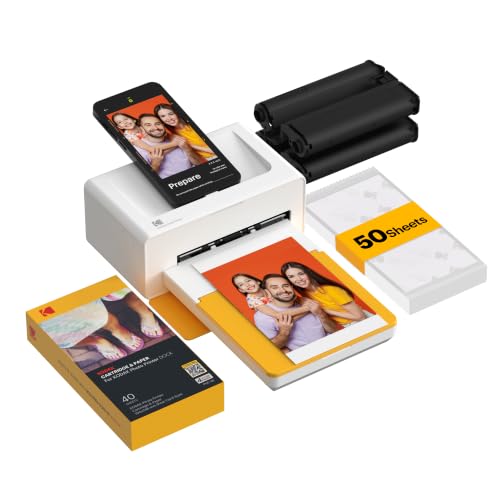
- Integrated phone dock and charging
- 4PASS dye-sublimation printing
- Simple Bluetooth app workflow
Best For: Easy 4x6 smartphone printing at home
Best Starter Bundle

- Includes two ink and paper sets
- Portable with battery support
- Wi-Fi, Bluetooth, SD, and USB options
Best For: Portable 4x6 printing with extra supplies included
Best All-in-One Value

- Print, scan, and copy in one device
- Automatic duplex printing
- Wi-Fi, Bluetooth, and USB connectivity
Best For: Home photo printing plus everyday documents and scanning
Best Portable Sticker Printer

- Portable dye-sublimation printing with a built-in battery
- Supports card-size and square sticker paper
- Dry, water-resistant prints in about 40 seconds
Best For: Mobile crafting, journaling, and sticker photos
Best for Everyday Use
HP Envy 5055 Wireless All-in-One

- Prints, scans, and copies in one device
- Supports automatic duplex printing and multiple media types
- Wireless, Bluetooth, USB, and cloud connectivity
Best For: Home offices needing photo and document functions
Best QX20 Bundle

- Includes a USB-C wall plug and cleaning kit
- Supports square and card-size sticker formats
- Portable prints with app-based creative controls
Best For: Crafting and mobile photo sharing with added accessories
Best Compact Dye-Sublimation Pick

- 300 DPI dye-sublimation 4x6 prints in under 60 seconds
- Includes 108 sheets and two ink ribbons
- Wi-Fi or built-in hotspot phone printing
Best For: Families, events, and smartphone photo albums
Best Crafting All-in-One
Canon PIXMA TS9521C Wireless Printer

- Supports 12x12-inch paper for crafting
- Prints, scans, copies, and duplexes
- Uses five individual inks with wireless connectivity
Best For: Scrapbooking, crafts, and mixed home-office use
Best Portable Canon Snapshot Printer
Canon SELPHY CP900 Wireless Photo Printer

- Compact 1.8-pound design with optional battery
- Water-resistant 4x6 photos in about 47 seconds
- Built-in 2.7-inch LCD and wireless device support
Best For: Portable 4x6 printing at home or events
Best Portable Pick – Epson PictureMate PM-400
The Epson PictureMate PM-400 is a practical choice among photo printers under 500 if you want compact, wireless printing for everyday snapshots. It produces borderless 4×6- and 5×7-inch photos, connects to smartphones and tablets, and can print a 4×6 photo in as fast as 36 seconds in the stated default mode.
Best For: Portable photo printing at gatherings, events, or home.
Pros:
- Compact, lightweight design weighing 6 pounds.
- Wireless printing from iOS devices, tablets, and smartphones.
- Supports borderless 4×6- and 5×7-inch photos.
- Prints a 4×6 borderless photo in as fast as 36 seconds in default mode.
Cons:
- Limited to a maximum media size of 5×7 inches.
- Epson Genuine Cartridges are required; damage from non-genuine ink may not be covered by the limited warranty.
The PM-400 stands out for shoppers who value mobility and straightforward wireless printing. Its small paper formats make it less suitable for general document printing, but its portability and photo-focused design are useful for on-the-go memories.
Best Docking Station – KODAK Dock Plus 4×6
The KODAK Dock Plus is a focused option among photo printers under 500 for producing 4×6-inch prints from a smartphone. Its integrated docking station provides a stable desktop setup and can charge a compatible phone while printing, while 4PASS dye-sublimation printing adds a protective lamination layer.
Best For: Home users who want simple 4×6 printing directly from a smartphone.
Pros:
- Integrated smartphone docking station with charging support.
- 4PASS prints use three color layers and a clear protective lamination layer.
- Bluetooth connection works with compatible iOS and Android devices through the KODAK app.
- Small desktop footprint measuring 8.5 by 4.5 by 2 inches.
Cons:
- Prints only 4×6-inch photos.
- Requires a power outlet for operation.
- Print speed is approximately 55 seconds per photo.
This model is best viewed as a dedicated smartphone photo station rather than a flexible all-purpose printer. Choose it for convenient, laminated 4×6 prints and app-based editing, especially when a stable home setup matters more than portability.
Best Starter Bundle – Canon SELPHY CP1500
The Canon SELPHY CP1500 bundle is a strong option among photo printers under 500 when you want a compact dye-sublimation printer with supplies included. This package includes the printer plus two Canon KP-108IN color ink and paper sets, supports 4×6-inch prints, and offers wireless printing alongside SD card, USB drive, and computer options.
Best For: Buyers who want a portable 4×6 photo printer with extra paper and ink in the box.
Pros:
- Bundle includes two KP-108IN color ink and paper sets.
- Portable design supports optional battery operation.
- Prints vibrant 300 x 300 dpi photos in about 4×6 inches.
- Offers Wi-Fi, Bluetooth, SD card, USB drive, and computer printing options.
Cons:
- Maximum print size is 4×6 inches.
- Battery support is available but the battery is not listed as included.
- Uses single-sided printing.
The CP1500 bundle provides useful flexibility for home use, travel, and small events, while the included supplies reduce the need for an immediate paper-and-ink purchase. It is a particularly practical pick if 4×6 prints meet your needs.
Best All-in-One Value – HP ENVY Photo 7155
The HP ENVY Photo 7155 broadens the definition of photo printers under 500 by combining photo printing with scanning and everyday document features. It supports glossy photo paper and plain paper, offers automatic duplex printing, and connects through Wi-Fi, Bluetooth, or USB.
Best For: Home users who need photo printing plus scanning and general-purpose document features.
Pros:
- All-in-one design includes printing and scanning.
- Supports photo paper, plain paper, and envelopes.
- Automatic duplex printing helps with two-sided documents.
- Offers a separate photo tray, touchscreen, Wi-Fi, Bluetooth, and USB connectivity.
Cons:
- Larger and heavier than the dedicated compact photo printers listed here, at 14 pounds.
- Photo printing uses inkjet cartridges rather than dye-sublimation printing.
- Maximum media size is 8.5×11 inches, while the listed output capacity is limited to 10 sheets.
The ENVY Photo 7155 is the most versatile choice in this group for a home office or family space. It makes sense when scanning, document printing, duplexing, and broader media support are as important as making photos.
Best Portable Sticker Printer – Canon SELPHY QX20
For shoppers comparing photo printers under 500, the Canon SELPHY QX20 is a compact dye-sublimation option for mobile photo printing. Its built-in battery, integrated paper tray, USB-C charging, and direct Android and iOS connectivity make it convenient for printing small sticker photos at home or on the go.
Best For: Portable journaling, scrapbooking, crafting, and casual sticker-photo printing.
Pros:
- Supports both 2.1-by-3.4-inch card-size and 2.7-by-2.7-inch square sticker paper.
- Prints dry, water-resistant, marker-ready photos in approximately 40 seconds.
- Compact 1.4-pound design with a built-in battery and USB-C charging.
- SELPhy Photo Layout app offers filters, stickers, and personalization tools.
Cons:
- Paper is not included and must be purchased separately.
- Designed for small-format prints rather than standard-size photos or documents.
The QX20 is a practical pick when portability and durable sticker prints matter more than versatility. Its small output formats limit its range, but the simple mobile workflow and fast, dry prints suit creative projects well.
Best for Everyday Use – HP Envy 5055 Wireless All-in-One
HP Envy 5055 Wireless All-in-One Photo Printer, Instant Ink, Works with Alexa (M2U85A)
Check Price On AmazonAmong photo printers under 500, the HP Envy 5055 stands out as a more versatile inkjet all-in-one. It prints, scans, and copies, supports wireless, Bluetooth, USB, and cloud connectivity, and handles media from 3-by-5-inch sheets through legal size.
Best For: Home users who want photo printing alongside everyday document scanning, copying, and printing.
Pros:
- Combines color printing, flatbed scanning, and copying in one machine.
- Supports automatic duplex printing and up to 100 sheets in its tray.
- Works with plain paper, card stock, envelopes, and labels.
- Compatible with HP Instant Ink and optional high-yield cartridges.
Cons:
- Its 7-page-per-minute color speed is slower than the listed black print speed.
- At 11.9 pounds, it is less portable than compact dedicated photo printers.
The Envy 5055 makes more sense for a home office that also prints photos than for users seeking a pocket-sized photo printer. Its scanning, copying, duplex, and broad media support provide useful everyday flexibility.
Best QX20 Bundle – Canon SELPHY QX20 Bundle
For buyers seeking photo printers under 500 with useful accessories, this Canon SELPHY QX20 bundle pairs the compact dye-sublimation printer with a USB-C wall plug and cleaning kit. It supports mobile printing from iOS and Android devices, two small sticker-paper formats, and bordered or three-sided borderless layouts.
Best For: Creative users who want a portable QX20 setup for scrapbooking, crafts, journaling, and sharing photos.
Pros:
- Includes the printer, USB-C wall plug, and cleaning kit.
- Built-in rechargeable battery and integrated paper tray support portable use.
- Produces dry, water-resistant, marker-ready prints with stated longevity of up to 100 years.
- SELphy Photo Layout app provides filters, stamps, frames, overlays, and collage tools.
Cons:
- Sticker paper is not listed among the included bundle items.
- Prints are limited to small card-size or square formats.
This bundle offers the same compact QX20 experience with added setup convenience. It is especially appealing if the included wall plug and cleaning kit are useful, though buyers still need to budget separately for compatible paper.
Best Compact Dye-Sublimation Pick – HPRT CP4100 4×6 Photo Printer
If you want a straightforward option among photo printers under 500, the HPRT CP4100 focuses on wireless 4×6 photo printing from phones and tablets. Its dye-sublimation process produces 300 DPI prints in under 60 seconds, while the included paper and ribbons let you begin printing immediately.
Best For: Families, events, photo albums, and anyone who primarily prints 4×6 photos from a smartphone.
Pros:
- Prints vibrant, detailed 4×6 photos with a protective coating designed to resist water, fingerprints, scratches, and fading.
- Supports printing through a 2.4GHz Wi-Fi network or its built-in hotspot without a home router.
- Includes 108 sheets of photo paper and two ink ribbons, with an advertised cost of about $0.28 per print.
- HeyPhoto app features templates, filters, frames, ID-photo creation, and AR video printing.
Cons:
- Maximum media size is 4×6 inches, so it is not suited to larger prints.
- It is a print-only device with no scanner or copier.
- Printing depends on the proprietary HeyPhoto app and wireless connectivity.
The CP4100 is a focused, compact choice for casual photo printing rather than a general-purpose home printer. Its bundled supplies and phone-friendly connectivity make it particularly practical for everyday snapshots and gatherings.
Best Crafting All-in-One – Canon PIXMA TS9521C Wireless Printer
For shoppers comparing photo printers under 500 that can also handle craft projects, the Canon PIXMA TS9521C offers a broader feature set than a dedicated snapshot printer. It supports 12×12-inch paper, borderless printing, scanning, copying, duplex printing, and wireless access from computers and mobile devices.
Best For: Scrapbookers, crafters, and households needing photo printing plus scanning and document functions.
Pros:
- Supports 12×12-inch paper for craft layouts and scrapbook projects.
- Five individual inks and ChromaLife100 technology are designed for detailed, fade-resistant photo output.
- Combines printing, scanning, copying, an auto document feeder, and duplex printing.
- Works with smartphones, tablets, computers, memory cards, AirPrint, and Mopria Print Service.
Cons:
- At 21.3 pounds, it is substantially less portable than compact photo printers.
- Its broader all-in-one feature set may be more than needed for occasional 4×6 snapshots.
- The listed color print speed is 10 pages per minute, so it is not primarily designed for rapid photo batches.
The TS9521C is the most versatile choice here for creative work. Choose it when large-format crafting and everyday office functions matter as much as photo quality; choose a compact dye-sublimation model if portability is the priority.
Best Portable Canon Snapshot Printer – Canon SELPHY CP900 Wireless Photo Printer
The Canon SELPHY CP900 is an older, compact option to consider among photo printers under 500 when portability is important. It prints water-resistant 4×6 photos in about 47 seconds, supports wireless printing from computers and mobile devices, and includes a tilt-up 2.7-inch LCD for previewing images.
Best For: Portable 4×6 photo printing at home, parties, or events, especially when a built-in display is useful.
Pros:
- Lightweight 1.8-pound body and optional battery support easier portable use.
- Produces water-resistant 4×6 photos designed to last up to 100 years.
- Offers wireless printing from computers, iOS devices, and Android devices.
- Built-in 2.7-inch tilt-up LCD and Portrait Image Optimize provide preview and enhancement tools.
Cons:
- Maximum media size is limited to 4×6 inches.
- The optional battery is not included according to the supplied notes.
- Its listed single-sheet capacity means it is better suited to small print jobs than high-volume output.
The CP900 makes sense for buyers who value a small footprint, wireless access, and on-device image preview. Its limited 4×6 format and single-sheet capacity make it less appropriate for large batches or versatile document printing.
How We Picked the Best Photo Printers Under 500
We selected models across several common use cases rather than focusing on one printer type. The lineup includes compact printers for 4-by-6-inch snapshots, portable smartphone-focused options, wireless all-in-ones, and a crafting model capable of larger paper formats.
Our evaluation criteria include print quality, color consistency, setup, wireless connectivity, supported paper sizes, speed, ink or cartridge convenience, and overall value. We also considered whether each printer is best suited to occasional family photos, frequent home printing, creative projects, or everyday document use.
Quick Comparison
| Printer Type | Best For | Key Consideration |
|---|---|---|
| Compact dye-sublimation | Fast, polished snapshot prints | Usually limited to specific photo sizes |
| Portable smartphone printer | Travel, parties, and casual sharing | Small print formats and consumable costs |
| Wireless all-in-one | Photos, documents, scanning, and copying | Larger footprint and more maintenance |
| Crafting photo printer | Scrapbooking and creative projects | Higher upfront complexity and broader paper needs |
Key Buying Factors for Photo Printers Under $500
Print Size and Format
Start with the photos you actually plan to make. Compact models commonly focus on 4-by-6-inch prints or smaller square and card formats, while all-in-one and crafting printers offer more flexibility. If you need borderless prints, verify the supported paper size and required app or driver settings.
Print Technology and Quality
Dye-sublimation printers are popular for snapshots because they typically produce smooth color transitions and finished prints with a protective coating. Inkjet models can offer more versatility and may be better for larger photos, documents, and specialty media, but print quality depends heavily on paper and ink condition.
Consumables and Running Costs
Compare the cost of replacement ink, ribbons, and paper—not just the printer price. Some compact printers use matched paper-and-ribbon packs, making per-print budgeting straightforward. Subscription programs may lower the cost for frequent inkjet users, but they can be unnecessary for occasional printing.
Connectivity and Software
Wi-Fi, Bluetooth, USB, smartphone apps, and direct docking each provide a different experience. Check compatibility with your phone and operating system, and look for features such as automatic photo correction, collage templates, and easy border or finish controls.
Who Should Buy Which Photo Printers Under 500?
Choose a compact dye-sublimation printer if you mainly want attractive 4-by-6-inch photos with simple, repeatable results. These models are especially convenient for albums, gifts, parties, and family snapshots.
Choose a portable smartphone printer if you want a small device for travel, events, or instant photo sharing. Prioritize battery or USB portability, app quality, and the price of paper-and-ribbon refills.
Choose a wireless all-in-one if you need one machine for photos, schoolwork, scanning, copying, and everyday documents. It is usually the better value for a home office, even if it takes up more space.
Choose a crafting-focused printer if you need broader media support or larger formats for scrapbooks, stickers, cards, and other projects. Confirm the maximum paper size and specialty-media compatibility before buying.