Recording a lecture can make review sessions more effective, but the best device depends on more than storage capacity. Microphone coverage, voice activation, battery life, file transfer, and transcription support all affect how useful your recordings will be.
We compare 10 podcast recorders for lectures, from simple pocket-sized dictaphones to more advanced handheld recorders. Use the guide below to match features, recording quality, and ease of use to your study or teaching routine.
Best 10 Podcast Recorders for Lectures Picks for 2026
Best Value for Students
EVISTR L357 Digital Voice Recorder

- 64GB storage with up to 4,660 hours at 32Kbps
- Voice activation with seven sensitivity levels
- Up to 32 hours of continuous recording
Best For: Students and teachers recording lectures on a budget
Best for Hybrid Recording
Zoom H4 Essential Handheld Recorder

- 32-bit float recording for clip-free audio
- Two XLR/TRS inputs plus built-in stereo microphones
- USB-C recording or streaming with SD backup
Best For: Creators recording lectures, podcasts, and external audio sources
Best for Maximum Storage
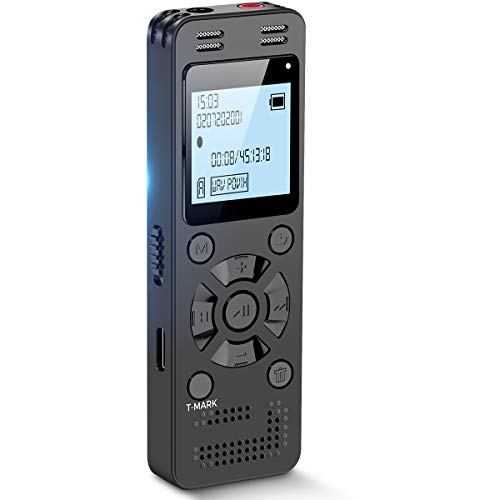
- 128GB capacity rated for up to 9,296 recording hours
- Six-level voice activation reduces blank sections
- Password protection and four-folder file organization
Best For: Frequent lecture recording and long-term file storage
Best for External Microphones

- Two locking XLR/TRS inputs for external sources
- 32-bit/96kHz recording with waveform display
- SDXC support up to 1TB and headphone monitoring
Best For: Lecture and podcast setups using external microphones
High-Capacity Lecture Companion
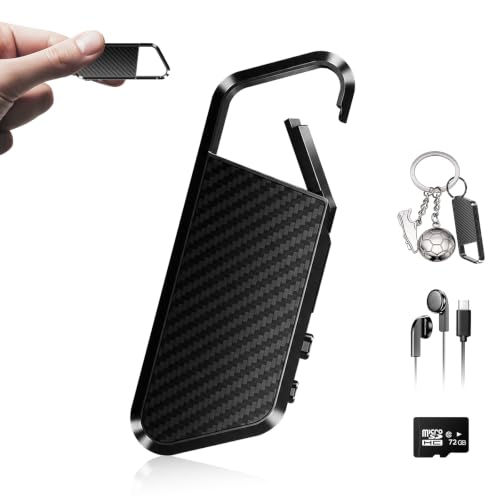
- 72GB storage for up to 10,860 hours
- DSP 6.0 noise reduction and voice activation
- OTG transfers to compatible phones and tablets
Best For: Long lecture sessions and users who need substantial storage
Simple Classroom Recording
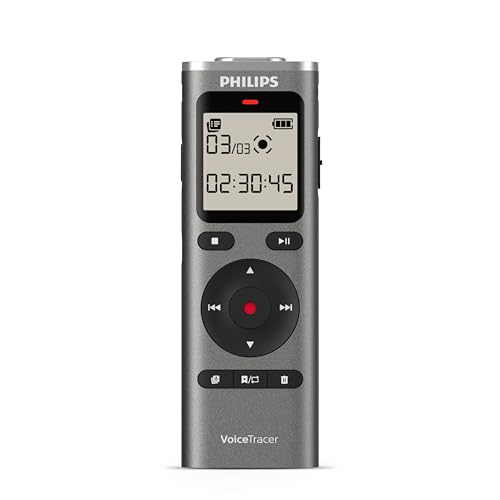
- 360-degree microphone for broad sound pickup
- Voice-activated WAV recording
- 8GB storage with MicroSD expansion
Best For: Organized lecture recording with simple, hands-free operation
Long-Running Stereo Recorder

- 160GB storage and 68-plus-hour battery life
- 1536Kbps stereo capture with dual microphones
- Scheduled recording and advanced playback tools
Best For: Long lectures, conferences, and detailed audio review
Best Budget Voice Recorder
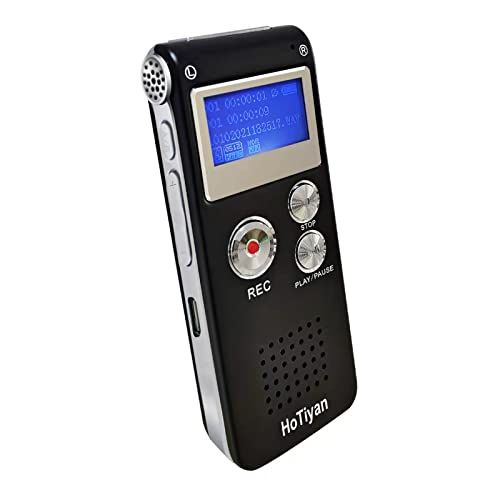
- Stereo recording with noise reduction
- Voice activation reduces silent sections
- A-B repeat and variable playback speed
Best For: Students seeking an affordable lecture recorder
Best Simple Controls
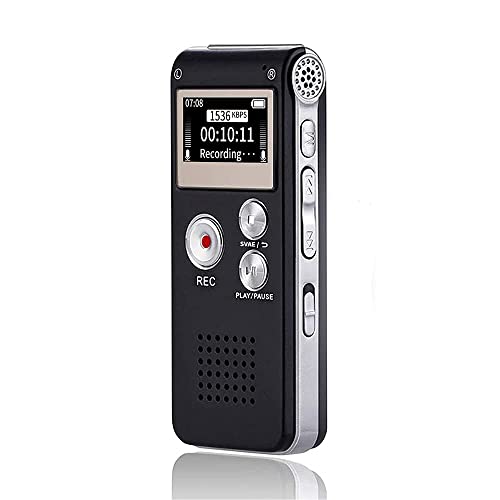
- Dedicated one-button recording control
- 16GB storage for frequent recordings
- Voice activation and DSP noise reduction
Best For: Users prioritizing simple lecture recording
Best for Transcription

- Three specialized stereo microphones
- Remote control through a smartphone app
- Sembly AI speech-to-text trial included
Best For: Users who want recording and transcription in one workflow
Best Value for Students – EVISTR L357 Digital Voice Recorder
For shoppers comparing podcast recorders for lectures, the EVISTR L357 focuses on long recording time, simple controls, and flexible playback. Its built-in microphone, voice activation, and 64GB storage make it practical for classes, meetings, and interviews.
Best For: Students and teachers who want a compact recorder with high capacity and voice-activated recording.
Pros:
- 64GB storage can hold up to 4,660 hours at 32Kbps.
- Voice activation and adjustable seven-level recording gain help reduce silence and capture distant speech.
- Supports WAV and MP3 recording, A-B repeat, variable-speed playback, and USB-C file transfers.
- Offers up to 32 hours of continuous recording on a full charge.
Cons:
- Uses a built-in microphone rather than external microphone inputs.
- Advanced settings may be more than some users need for basic lecture recording.
The L357 is a sensible choice when storage, battery endurance, and straightforward operation matter more than studio-style connectivity.
Best for Hybrid Recording – Zoom H4 Essential Handheld Recorder
Among podcast recorders for lectures, the Zoom H4 Essential is suited to users who may also record interviews, podcasts, performances, or presentations. It combines built-in stereo microphones with two XLR/TRS inputs and can save audio to an SD card while connecting to a computer, phone, or tablet over USB-C.
Best For: Creators who want one recorder for lectures, external microphones, instruments, and USB recording.
Pros:
- 32-bit float recording is designed to help avoid distorted takes.
- Four-track recording supports more involved audio setups.
- Built-in stereo microphones plus two XLR/TRS inputs provide flexible source options.
- Spoken menu guidance can make navigation easier, while USB-C supports recording or streaming.
Cons:
- Requires two AA batteries and has a more involved setup than a basic dictaphone.
- Its broader feature set may be unnecessary for simple voice-only lectures.
The H4 Essential is the stronger pick for a lecture recorder that can grow into a podcasting or field-recording setup.
Best for Maximum Storage – EVIDA V601 Voice Recorder
The EVIDA V601 is a practical option for podcast recorders for lectures when you want extensive onboard storage and voice-activated capture. Its 128GB capacity, password protection, folder organization, and playback tools are useful for students, professionals, and anyone managing many recordings.
Best For: Users who need high storage capacity, voice activation, and organized lecture files.
Pros:
- 128GB storage is rated for up to 9,296 hours of recording.
- Six voice-activation sensitivity levels help limit silent sections.
- Supports MP3 and WAV recording, A-B repeat, bookmarks, and scheduled recording.
- Password protection and four storage folders help organize recordings.
Cons:
- The built-in microphone operates in mono rather than stereo.
- No headphone jack is listed in the specifications.
- Battery life is rated at up to 54 hours, so long sessions still require charging planning.
The V601 stands out for archive-friendly storage and file management, making it a good fit for users who record frequently and keep sessions for later review.
Best for External Microphones – Zoom H1 XLR Recorder
For podcast recorders for lectures that need external microphones, the Zoom H1 XLR offers two locking XLR/TRS inputs and 32-bit/96kHz recording. Its waveform display, headphone output, and support for SDXC cards up to 1TB make it suitable for more controlled lecture, interview, and podcast setups.
Best For: Users connecting professional microphones or other audio sources while monitoring levels during recording.
Pros:
- Two locking XLR/TRS inputs support microphones, instruments, and other sources.
- 32-bit/96kHz recording provides detailed audio and clip-free capture.
- OLED waveform display helps monitor recording levels.
- Supports SDXC cards up to 1TB and includes 3.5mm stereo input and headphone output.
Cons:
- Requires two AA batteries and lists up to 10 hours of battery life.
- Does not include the broader four-track feature set of the H4 Essential.
- External microphones or cables may be needed for the most capable setup.
The H1 XLR is a focused choice for lecture recording where microphone flexibility and level monitoring are more important than maximum simplicity.
High-Capacity Lecture Companion – 72GB Voice Activated Recorder
For shoppers comparing podcast recorders for lectures, this NekSide model emphasizes long-term storage, voice activation, and straightforward mobile file transfers. Its DSP 6.0 noise reduction is designed to help maintain clear audio in busy lecture halls, meetings, and interview settings.
Best For: Students and professionals who want extensive storage and convenient smartphone or tablet transfers.
Pros:
- 72GB of built-in storage rated for up to 10,860 hours of audio.
- DSP 6.0 noise reduction and HD recording help filter background noise.
- Voice activation, playback, and OTG connectivity support hands-free use and direct mobile transfers.
- Compact six-inch-tall design is easy to carry in a pocket or bag.
Cons:
- Records in WAV by default; MP3 requires conversion through a computer.
- Built-in mono microphone may be less suitable for wide stereo ambience.
- The listed headphone connection is Mini-USB rather than a standard 3.5mm jack.
This is a practical choice when storage capacity and portability matter most. Choose it for extended lecture recording and simple mobile transfers, while keeping the WAV-to-MP3 conversion requirement in mind.
Simple Classroom Recording – Philips DVT1170 VoiceTracer
The Philips DVT1170 is a straightforward option among podcast recorders for lectures, pairing a 360-degree microphone with voice-activated WAV recording. Its time-stamped files and expandable storage can make longer course recordings easier to organize and review.
Best For: Students and note-takers who prefer a familiar recorder with simple controls, long battery runtime, and expandable memory.
Pros:
- 360-degree built-in microphone is designed to capture sound from different directions.
- Voice activation enables hands-free recording during lectures.
- 8GB internal memory plus a MicroSD card slot supports expanded capacity.
- Time-stamped WAV files help with organization and navigation.
Cons:
- Internal storage is considerably smaller than the other high-capacity options here.
- Uses two AAA batteries rather than a built-in rechargeable battery.
- Mono recording may not provide stereo separation for room ambience.
The DVT1170 favors ease of use over headline storage capacity. It is a sensible lecture recorder for buyers who value directional flexibility, organized files, and the option to add a MicroSD card.
Long-Running Stereo Recorder – 160GB Digital Voice Recorder
For shoppers seeking podcast recorders for lectures with stereo capture and extended runtime, this NEXTSIGNAL recorder combines 160GB of stated storage with a 68-plus-hour battery life. Its dual microphones, multiple recording modes, and playback tools are suited to lectures, conferences, interviews, and review-heavy workflows.
Best For: Users recording long sessions who want stereo audio, flexible recording modes, and detailed playback controls.
Pros:
- 160GB combined storage is rated for up to 11,500 hours of stereo recordings.
- 1536Kbps stereo recording, dual microphones, and noise reduction target detailed sound.
- 68-plus-hour rechargeable battery life supports extended sessions.
- Offers voice control, scheduled and segment recording, bookmarking, A-B repeat, and variable-speed playback.
Cons:
- The product notes do not specify the exact brand model designation beyond NEXTSIGNAL.
- Its 1.44-inch screen may feel small for navigating extensive recordings.
- Multiple modes and playback features may be more involved than needed for basic dictation.
This model is the most feature-rich choice of the three for long lectures and post-session review. Its stereo recording, strong stated endurance, and playback controls make it appealing when capturing and studying detailed audio are priorities.
Best Budget Voice Recorder – 8GB Voice-Activated Recorder
If you want straightforward podcast recorders for lectures, this compact HoTiyan model offers stereo recording, voice activation, and simple three-button controls. Its 8GB storage supports multiple recording-quality settings, while A-B repeat and variable playback speed can help with reviewing important sections.
Best For: Students and users who want an affordable, compact recorder for lectures, meetings, and basic playback.
Pros:
- Built-in stereo microphone with noise reduction and MP3/WAV recording.
- Voice activation can reduce silent sections and conserve storage.
- Supports up to 20 hours of continuous recording and includes A-B repeat, variable speed, and password protection.
- Works as an MP3 player and transfers files through the supplied Micro USB cable.
Cons:
- Storage is limited to 8GB.
- Micro USB connectivity is older than USB-C.
- Recording capacity varies substantially by selected quality setting.
This is a practical pick when ease of use and review features matter more than advanced transcription tools. The voice-activated mode and repeat functions are particularly useful for lecture study.
Best Simple Controls – 16GB Noise-Reducing Recorder
For shoppers comparing podcast recorders for lectures, the Sunlan digital recorder emphasizes uncomplicated operation and extra storage. A dedicated REC button starts recording, while noise reduction, voice activation, and A-B playback help capture and review spoken material.
Best For: Lecture and meeting recording when one-button operation, 16GB storage, and basic playback are priorities.
Pros:
- Simple REC, STOP, and PLAY controls are easy to operate.
- DSP noise reduction and a sensitive microphone are designed to capture clearer speech.
- 16GB storage provides more capacity than the 8GB models listed here.
- Voice activation can conserve recording time and power; the device also works as a music player and removable USB storage.
Cons:
- It records in WAV format and uses a mono microphone mode.
- Continuous recording is rated at more than 30 hours, with up to 7 hours of playback.
- The supplied details do not mention advanced transcription features.
This model is a sensible choice for users who want a dedicated recorder without a complicated interface. Its larger storage and voice-activated mode suit frequent lecture recording, while the mono setup is more focused on speech than spacious stereo audio.
Best for Transcription – Philips VoiceTracer DVT4115
The Philips VoiceTracer DVT4115 is the most feature-rich option among these podcast recorders for lectures. Its three specialized stereo microphones are designed for distant speakers, and the included Sembly AI speech-to-text trial adds a transcription workflow for turning recordings into written notes.
Best For: Students, professionals, and interviewers who want stereo recording plus remote control and speech-to-text support.
Pros:
- Three specialized stereo microphones are designed for meetings, lectures, interviews, and conferences.
- Smartphone app remote control allows recording management from a distance.
- Supports stereo MP3 and PCM recording and includes 8GB internal memory.
- Sembly features support speech-to-text and multi-speaker meeting minutes.
Cons:
- Its advanced features may be more than needed for simple voice notes.
- Transcription functionality is described as a Sembly AI trial, so ongoing access may require separate terms.
- At 93 g, it is heavier than the smaller recorders listed above.
This is the strongest fit for buyers who want to move beyond recording into transcription and organized review. The stereo microphone array and remote app control make it especially useful in larger lecture or meeting settings.
How We Picked These Podcast Recorders for Lectures
We focused on features that matter in classrooms, lecture halls, seminars, and interviews. The selection includes dedicated voice recorders with generous internal storage, playback controls, voice-activation modes, and rechargeable designs, along with more capable handheld recorders for users who want higher-quality audio or multiple connection options.
We also considered microphone design, portability, memory expansion, file management, and practical extras such as noise reduction and speech-to-text tools. Storage claims are useful, but recording time varies with file format and quality settings, so capacity should not be the only deciding factor.
Quick Comparison
| Best For | Features to Prioritize | Recommended Type |
|---|---|---|
| Everyday lecture recording | Simple controls, voice activation, long battery life | Compact digital voice recorder |
| Large lecture libraries | High storage capacity, microSD support, easy file transfer | High-capacity voice recorder |
| Clearer classroom speech | Multiple microphones, noise reduction, adjustable recording quality | Advanced voice recorder |
| Lectures plus music or video work | XLR inputs, manual controls, high-resolution recording | Handheld field recorder |
| Fast review and note creation | Playback controls, transcription compatibility, organized files | Voice recorder with smart features |
Key Buying Factors for Podcast Recorders for Lectures
Microphone Pickup and Recording Quality
For most lectures, intelligible speech is more important than studio-grade sound. A built-in stereo or 360-degree microphone can help capture a wider area, while noise-reduction processing may improve clarity in busy rooms. If you sit far from the speaker, microphone placement will usually matter more than maximum storage.
Storage, File Formats, and Transfers
Choose enough storage for your schedule, especially if you record several classes each week. USB connectivity makes it easier to move files to a computer, while a microSD slot provides flexibility on compatible models. Check whether the recorder uses common formats such as MP3 or WAV and whether your preferred note-taking apps can import them.
Battery Life and Usability
Look for a battery that can cover a full day of classes, plus clear status indicators and physical controls that are easy to operate quietly. Voice activation can reduce empty sections and conserve storage, but test its sensitivity before relying on it for an important lecture.
Portability and Privacy
A small recorder is easier to carry and position discreetly on a desk. Password protection can help safeguard files, but it does not replace responsible handling. Always follow school, workplace, and local consent rules before recording other people.
Who Should Buy Which Podcast Recorders for Lectures?
Students who want simplicity: Choose a compact digital voice recorder with playback, voice activation, and rechargeable power. These models are generally easier to learn and sufficient for regular classroom use.
Students with many recordings: Prioritize high-capacity storage or microSD expansion, particularly if you keep recordings throughout a semester rather than deleting them after review.
Users who need clearer speech: Look for a model with a capable microphone array, noise reduction, and adjustable quality settings. Position it near the lecturer whenever possible.
Creators and advanced users: A handheld recorder with XLR inputs and manual controls is the better choice if the device will also serve for podcasts, music, filmmaking, or external microphones.
Anyone building searchable notes: Consider a recorder with transcription-related features or broad compatibility with speech-to-text services, while checking whether trials, subscriptions, or online accounts are required.