
The best wireless sublimation printers make it easier to design and transfer vibrant artwork for shirts, mugs, totes, gloves, and other compatible blanks without being tethered to a computer. This roundup covers purpose-built sublimation models, conversion-friendly EcoTank printers, and starter bundles with useful accessories.
Use the comparisons below to match print size, ink costs, connectivity, included supplies, and workflow convenience to your projects. Before buying, confirm that the printer supports sublimation ink and that your chosen blanks have a compatible polyester coating.
Best 10 Wireless Sublimation Printers Picks for 2026
Best Compact Pro Pick

- Dedicated dye-sublimation printer with PrecisionCore printhead
- Wi-Fi, USB, and Ethernet connectivity
- 150-sheet enclosed auto-feed tray
Best For: Compact customization businesses and personalized gifts
Best Wide-Format Versatility Pick

- Supports media up to 11 x 17 inches
- Wi-Fi, Ethernet, and USB connectivity
- Prints, scans, copies, and faxes
Best For: Wide-format general printing with potential sublimation use
Best Ready-to-Craft Bundle

- Includes printer, full CMYK ink set, and transfer paper
- Adds 50 blanks, heat-resistant tape, and designs
- Wi-Fi and Ethernet connectivity
Best For: Beginners and small businesses wanting a supplied starter kit
Best Wide-Format Pick

- Six-color refillable ink system
- Prints up to 13 x 19 inches
- Wireless all-in-one functionality
Best For: Wide-format photos and creative home projects
Best Complete Sublimation Bundle
PC Universal Super-Tank Bundle

- Dedicated four-color dye sublimation system
- Includes flat board press and accessories
- Wireless, Bluetooth, and USB connectivity
Best For: Custom fabric and tote-bag projects
Best Compact Budget Tank

- High-yield refillable ink tanks
- Compact 6.8-pound design
- Wireless printing with a 100-sheet tray
Best For: Affordable home documents and photos
Best Budget EcoTank

- Refillable cartridge-free ink tanks
- Wi-Fi printing, scanning, and copying
- Includes up to two years of ink
Best For: Budget-conscious home users needing an all-in-one printer
Best Compact Home Pick

- Up to 3,600 black/6,500 color pages
- Keyed, easy-refill EcoFit bottles
- Compact all-in-one with color display
Best For: Home users seeking simple, economical wireless printing
Best Productivity Features
ET-2988 Renewed Wireless Duplex
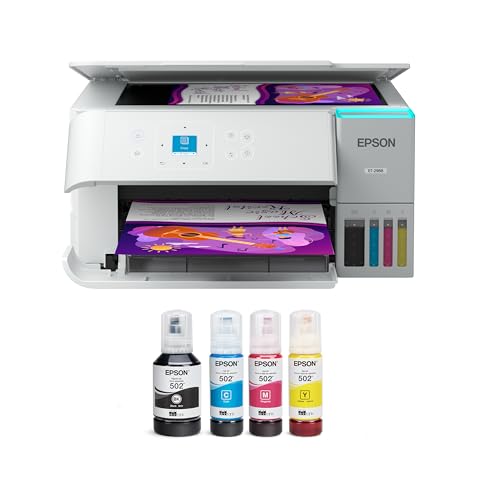
- Up to 15 black/8 color ISO ppm
- Automatic two-sided printing
- Wi-Fi mobile printing with major services
Best For: Home offices needing faster, duplex-capable printing
Best Compact Pro Pick – Epson SureColor F170
The Epson SureColor F170 is a strong choice among wireless sublimation printers for makers and small customization businesses that want a compact, dedicated dye-sublimation machine. It supports Wi-Fi, USB, and Ethernet connections, prints up to 8.5 inches wide, and includes genuine Epson sublimation ink.
Best For: Customization businesses, personalized gifts, and users who value compact size and consistent color output.
Pros:
- Wi-Fi, USB, and Ethernet connectivity, with support for Epson iPrint on Android and iOS.
- Includes a full set of Epson sublimation ink, a user guide, and power cable.
- 150-sheet enclosed auto-feed tray helps reduce paper preparation and dust exposure.
- PrecisionCore printhead and Precision Droplet Control are designed for clear, detailed images.
Cons:
- Maximum media width is limited to 8.5 inches.
- It is a print-only model and does not support direct email printing or camera connections.
- A heat press and compatible sublimation blanks are not included.
Choose the F170 when you want a dedicated, network-ready sublimation printer with a relatively small footprint and useful included supplies. Its narrower format may be limiting for larger apparel designs.
Best App-Centered Pick – Brother SP-1 Sublimation Printer
The Brother SP-1 is one of the more approachable wireless sublimation printers for phone- and tablet-based crafting. Its Artspira app provides designs and image tools, while Wi-Fi connectivity supports a workflow built around creating, printing, heat pressing, and finishing custom projects.
Best For: DIY crafters and beginners making shirts, mugs, tumblers, bags, hats, and similar polyester-coated projects.
Pros:
- Works with the Artspira app, including more than 100 sublimation designs and image tools.
- Includes Brother genuine CMYK sublimation ink and a starter pack of sublimation paper.
- Wi-Fi connectivity supports creation and printing from a phone or tablet.
- Brother states that finished sublimation projects can remain vibrant through repeated washing and wear.
Cons:
- A heat press is required and must be purchased separately.
- The supplied notes identify the current creative workflow as app-based, with the desktop version coming soon.
- It is intended for sale in the U.S. at 120 volts; other use may void the warranty.
The SP-1 makes sense if you prefer a guided mobile design experience over a more traditional computer-first setup. Confirm app compatibility and plan for a separate heat press before buying.
Best Wide-Format Versatility Pick – Epson EcoTank ET-15000
The Epson EcoTank ET-15000 is an all-in-one inkjet rather than a purpose-built sublimation printer, but its supplied specifications list standard or sublimation ink as a possible use. For shoppers comparing wireless sublimation printers, it stands out for its wide-format support, refillable tanks, scanning, copying, faxing, and Wi-Fi connectivity.
Best For: Users who need a general-purpose wide-format office printer that may also support sublimation-related work with suitable ink and media.
Pros:
- Wi-Fi, Ethernet, and USB connectivity support flexible setup.
- Handles media up to 11 x 17 inches, offering more size flexibility than 8.5-inch models.
- All-in-one functionality includes printing, scanning, copying, and faxing.
- Refillable EcoTank design and a 250-sheet maximum capacity support ongoing general printing.
Cons:
- It is an inkjet all-in-one, not a dedicated dye-sublimation printer.
- The supplied bundle includes standard Epson ink rather than a dedicated sublimation ink set.
- Users should verify ink, paper, and workflow compatibility before attempting sublimation transfers.
This model is best considered a versatile alternative rather than a straightforward sublimation starter. Its wider paper support and office features are useful, but buyers seeking a dedicated sublimation setup may prefer the F170 or SP-1.
Best Ready-to-Craft Bundle – Brother SP-1 Starter Bundle
The Brother SP-1 Starter Bundle is a practical option among wireless sublimation printers for shoppers who want more than the printer alone. Along with the SP-1 and a full CMYK ink set, the package includes transfer paper, sublimation blanks, heat-resistant tape, design resources, and Wi-Fi connectivity for a quicker start.
Best For: Hobbyists, artists, and small businesses that want supplies for testing multiple sublimation projects immediately.
Pros:
- Includes the Brother SP-1 printer and full black, cyan, magenta, and yellow ink set.
- Comes with 160 total listed sublimation sheets, including ProSub and Brother paper.
- Includes 50 sublimation blanks, four rolls of heat-resistant tape, and design resources.
- Supports Wi-Fi and Ethernet connections and is listed as compatible with Windows, Mac, and the app.
Cons:
- The supplied bundle does not list a heat press, so one is still required.
- The package combines third-party and Brother supplies, so users should follow media and application guidance carefully.
- The listed 600 x 600 dpi resolution is lower than some other specifications in this roundup.
For buyers assembling a first sublimation workspace, the bundle reduces the need to source paper, blanks, tape, and designs separately. It offers strong convenience, though the total setup still requires a compatible heat press.
Best Wide-Format Pick – Epson EcoTank Photo ET-8550
The Epson EcoTank Photo ET-8550 is a strong option for shoppers comparing wireless sublimation printers who also need a versatile home printer for photos and creative projects. Its refillable six-color ink system, wireless connectivity, scanner, copier, and support for media up to 13 x 19 inches make it suited to larger-format color work.
Best For: Home users who prioritize vivid photo and creative printing, wide-format media support, and lower ongoing ink costs.
Pros:
- Cartridge-free six-color ink system with included ink designed to last up to two years.
- Supports prints up to 13 x 19 inches and includes print, scan, and copy functions.
- Wireless control works with iOS, Android, PCs, and smartphones.
Cons:
- Its 24.5-pound, wide-format design requires more workspace than a basic home printer.
- The supplied notes describe it as an inkjet photo printer, not a dedicated dye-sublimation printer.
The ET-8550 stands out when image quality, large media handling, and refillable printing matter more than compact size. Confirm material and ink compatibility before using it for sublimation-specific projects.
Best Complete Sublimation Bundle – PC Universal Super-Tank Bundle
For shoppers specifically seeking wireless sublimation printers, this PC Universal Super-Tank bundle is the most directly focused option in the lineup. It combines a four-color dye-sublimation printer with wireless computer and mobile printing, a flat board press machine, and accessories for custom apparel and tote-bag projects.
Best For: Beginners or small creators who want a bundled setup for custom T-shirts, gloves, and tote bags.
Pros:
- Uses a four-color dye-sublimation ink system for fabric-focused projects.
- Includes a flat board press machine and accessories, reducing the need to source equipment separately.
- Supports wireless printing from computers and mobile devices, with Bluetooth and USB connectivity.
- Lists up to 10,000 pages of bundle yield and an 11 x 17-inch maximum media size.
Cons:
- The generic-brand listing provides less brand-specific information than the Epson alternatives.
- Simplex printing and a 10-sheet output capacity may require more hands-on workflow management.
This is the clearest match for a buyer who wants sublimation equipment rather than a general-purpose inkjet. Its included press and accessories add convenience, while the four-color system keeps the setup straightforward for custom fabric work.
Best Compact Budget Tank – Epson EcoTank ET-1913
The Epson EcoTank ET-1913 is a compact wireless printer for everyday home documents and photos, making it a practical alternative for buyers researching wireless sublimation printers who mainly need low-cost general printing. Its refillable tanks, 100-sheet tray, and included supply of ink help keep routine printing simple.
Best For: Home users who want an affordable, compact printer with high-yield refillable ink for general documents and photos.
Pros:
- Includes enough ink to print up to 3,600 black pages or 6,500 color pages.
- Refillable EcoFit bottles are keyed for simpler, less confusing ink refills.
- Compact 6.8-pound design with a 100-sheet tray and wireless connectivity.
Cons:
- Supports media only up to 8.5 x 14 inches, limiting larger designs.
- It is an inkjet printer for paper, not a dedicated dye-sublimation printer for fabric transfer work.
- It prints only and does not include scanning or copying functions.
The ET-1913 makes sense when low operating costs and a small footprint are the priorities. For true sublimation applications, choose a model specifically identified for dye-sublimation printing and verify the required transfer materials.
Best Budget EcoTank – ET-2800 Wireless All-in-One
The Epson EcoTank ET-2800 is a practical entry point for shoppers comparing wireless sublimation printers, especially if they also need scanning and copying for everyday home use. Its refillable tanks, Wi-Fi connectivity, and included ink help keep routine printing convenient, though buyers should verify sublimation compatibility for their specific workflow.
Best For: Home users who want an economical wireless color printer with scanning and copying.
Pros:
- Cartridge-free refillable ink tanks reduce frequent cartridge replacements.
- Wi-Fi supports printing, scanning, and copying from computers, laptops, and smartphones.
- All-in-one design includes color printing, flatbed scanning, and copying.
- Includes up to two years of ink for typical home printing needs.
Cons:
- Simplex printing only; it does not offer automatic two-sided printing.
- Color print speed is rated at 5 pages per minute.
- Epson recommends genuine ink, which may limit ink-substitution options.
The ET-2800 makes the most sense for budget-conscious home users who value low-maintenance ink refills and wireless convenience. Its compact all-in-one feature set is useful, but its modest speed and lack of auto-duplex printing may matter for heavier workloads.
Best Compact Home Pick – ET-2900 Wireless Supertank
The Epson EcoTank ET-2900 is a compact wireless option for shoppers researching wireless sublimation printers alongside everyday document and photo printing. It combines refillable tanks, a flatbed scanner, a color display, and a 100-sheet tray in a small home-friendly design; confirm media and ink requirements before using it for sublimation projects.
Best For: Home and small-office users who prioritize simple refilling and a compact footprint.
Pros:
- Supplied ink is rated for up to 3,600 black or 6,500 color pages.
- Keyed EcoFit bottles are designed for simpler, cleaner refilling.
- Wi-Fi connectivity supports convenient wireless printing.
- Includes a flatbed scanner, 1.44-inch color display, and 100-sheet tray.
Cons:
- It prints at up to 11 black and 6 color ISO pages per minute.
- Printing is simplex rather than automatic duplex.
- The listed functions and media support are oriented toward standard paper and photo printing.
The ET-2900 is a sensible choice when low running hassle and small-space convenience matter more than advanced productivity features. Its generous included ink and straightforward controls are appealing for regular home printing, while sublimation buyers should independently confirm compatibility.
Best Productivity Features – ET-2988 Renewed Wireless Duplex
The renewed Epson EcoTank ET-2988 stands out among wireless sublimation printers for shoppers who also want faster everyday document handling and automatic two-sided printing. It offers refillable tanks, Wi-Fi mobile printing, a scanner, and a color display, but buyers should verify the renewed condition and confirm sublimation-specific compatibility before purchase.
Best For: Home offices that need faster printing and automatic duplex capability.
Pros:
- Fastest listed performance in this group at up to 15 black and 8 color ISO pages per minute.
- Automatic duplex printing helps reduce manual paper handling.
- Wi-Fi mobile printing works with Epson Smart Panel, Apple AirPrint, and Mopria services.
- Refillable tanks and included ink support high-volume everyday printing.
Cons:
- This is a renewed product, so condition may vary from a new unit.
- It has a 100-sheet paper capacity and one paper tray.
- Epson recommends genuine ink for optimal performance and warranty coverage.
The ET-2988 is the strongest productivity-oriented option here, thanks to its higher rated speed and automatic duplex printing. Its renewed status makes it worth evaluating carefully, while its wireless features and refillable system suit users with regular home-office demands.
How We Picked These Wireless Sublimation Printers
We selected models based on their suitability for heat-transfer projects, wireless connectivity, print quality, usable media sizes, ink management, and overall value. The list includes dedicated sublimation printers such as the Epson SureColor F170 and Brother SP-1, as well as wireless supertank models commonly considered for sublimation conversions. Starter bundles received additional consideration because included paper, blanks, tape, and ink can reduce the cost of getting started.
Because printer specifications and included accessories can vary by retailer or bundle, verify the current package contents and manufacturer requirements before ordering. A standard inkjet printer is not automatically sublimation-ready; using unsuitable ink can damage the printer or produce poor transfers.
Quick Comparison
| Best For | What to Prioritize | Models to Consider |
|---|---|---|
| Dedicated sublimation workflow | Purpose-built ink system and straightforward setup | Epson SureColor F170, Brother SP-1 |
| Wide-format projects | Larger media support and photo-oriented output | Epson ET-15000, ET-8550 |
| Beginners and gift makers | Simple wireless printing and low running costs | Epson ET-2800, ET-2900, ET-1913 |
| All-in-one home use | Scanning, copying, and everyday document printing | Epson ET-2988, ET-15000 |
| Starter setup | Included blanks, transfer paper, and accessories | Brother SP-1 bundle and PC Universal bundle |
Key Buying Factors for Wireless Sublimation Printers
Dedicated Versus Converted Printers
Dedicated Wireless Sublimation Printers are usually the safer choice for predictable transfers and manufacturer-supported supplies. Conversion-friendly tank printers may cost less or offer more general-purpose features, but they require careful setup and should be used with a compatible sublimation ink system. Once sublimation ink is installed, switching back to ordinary ink may not be practical.
Print Size and Media Handling
Check the largest sheet size before buying. Compact 8.5-by-11-inch models work well for small apparel designs, mugs, and accessories, while wide-format printers provide more flexibility for larger shirts, signs, and multi-item layouts. Also confirm whether the printer accepts the paper weight and transfer sheets you plan to use.
Wireless Setup and Software
Wi-Fi printing is helpful when designs are created on a laptop, tablet, or phone, but app and operating-system support varies. Look for straightforward network setup, reliable driver support, and a workflow that preserves accurate sizing and mirrored artwork. Sublimation transfers generally require the design to be mirrored before printing.
Ink Costs and Included Supplies
Refillable tanks can lower the cost per page, particularly for frequent production. Compare replacement ink pricing rather than focusing only on the printer’s upfront cost. Bundles can be worthwhile if you will use the included blanks and paper, but check quality, quantities, and compatibility before treating accessories as added value.
Who Should Buy Which Wireless Sublimation Printers?
Choose a dedicated Epson or Brother model if you want the simplest path to regular sublimation production. Pick a wide-format EcoTank when larger designs and occasional everyday printing matter more than compact size. Entry-level EcoTank models suit hobbyists making small batches at home, while a bundle is convenient for beginners who need supplies immediately.
For frequent business use, prioritize supported sublimation hardware, dependable wireless networking, economical replacement ink, and a print size that matches your products. For occasional crafting, avoid paying for capacity you will not use and focus on easy setup, included materials, and reliable access to transfer paper and compatible blanks.